Archives 2025

Understanding SaaS Metrics: URR and ACV Explained


In the world of SaaS, understanding business data is mission-critical. However, while everyone talks about churn rate, MRR, or NPS, two metrics quietly drive long-term success: User Retention Rate (URR) and Annual Contract Value (ACV).

They’re core indicators of customer health and revenue potential. URR shows whether users stick with your product after onboarding. ACV helps you understand the financial weight of each customer relationship. Used together, they form what we call the “engagement-to-revenue” feedback loop—a simple but powerful way to align Customer Success with bottom-line growth.

In this guide, we’ll unpack what URR and ACV mean, why they matter, and how they work together to boost retention, drive expansion, and shape scalable Customer Success (CS) strategies. We’ll also explore real-world examples from SaaS companies using these metrics to fuel growth—so you can do the same.

The Importance of Metrics in SaaS Success

Metrics are the foundation of every wise decision, from how you onboard users to where your customer success team spends their time. Without the right KPIs, it’s impossible to know what’s working, what’s not, and which customers are silently slipping away.

While high-level numbers like Monthly Recurring Revenue (MRR) or Customer Lifetime Value (CLTV) are great for executive dashboards, they don’t tell the whole story of customer engagement or potential growth. That’s where User Retention Rate (URR) and Annual Contract Value (ACV) come in.

Together, they give your team a strategic edge:

  • Spot red flags early (like a high-ACV account with dropping URR)
  • Tailor your engagement based on customer value and behavior
  • Align customer success with revenue, not just satisfaction

What URR Is and Why It Matters

Usage Retention Rate (URR) measures the percentage of users who continue to actively engage with your product after completing the onboarding phase. It provides a clear indication of how well your product delivers value early in the customer journey—an essential factor in preventing churn and fostering long-term engagement.

It shows how many users continue actively engaging with your product after they complete onboarding. It tells you if customers are getting real value from your product—early and often. And that’s the data you need to reduce churn and drive product adoption.

How to Calculate URR

The formula is straightforward:

URR (%) = (Number of active users in a given period ÷ Number of users at the beginning of that period) × 100

Let’s break it down with a simple example: Your SaaS platform onboarded 1,000 users in Month 1. In Month 2, 700 of them returned to use the product. That’s a URR of 70%.

This tells you that 30% of your newly onboarded users failed to engage within a month—an early red flag that can inform onboarding tweaks, feature walkthroughs, or tailored success touchpoints.

Why It Matters for CS and Product Teams

Customer Success teams can use URR to:

  • Identify drop-off points post-onboarding
  • Tailor engagement campaigns based on real usage
  • Flag accounts at risk before churn happens.

Meanwhile, Product teams can:

  • See which features get used
  • Refine UX based on usage trends
  • Prioritize development based on user stickiness.

In short, URR turns vague satisfaction into explicit action. It’s beneficial during the first 30 to 90 days when customers are still forming habits around your product.

Want to go deeper? Check out our guide to turning retention data into actionable strategies with Custify.

Real-world example: Mailchimp tracked user retention closely post-onboarding, discovering a significant improvement in URR after introducing interactive onboarding tutorials. This drove a 22% increase in user retention within 60 days.

What is a retention curve?

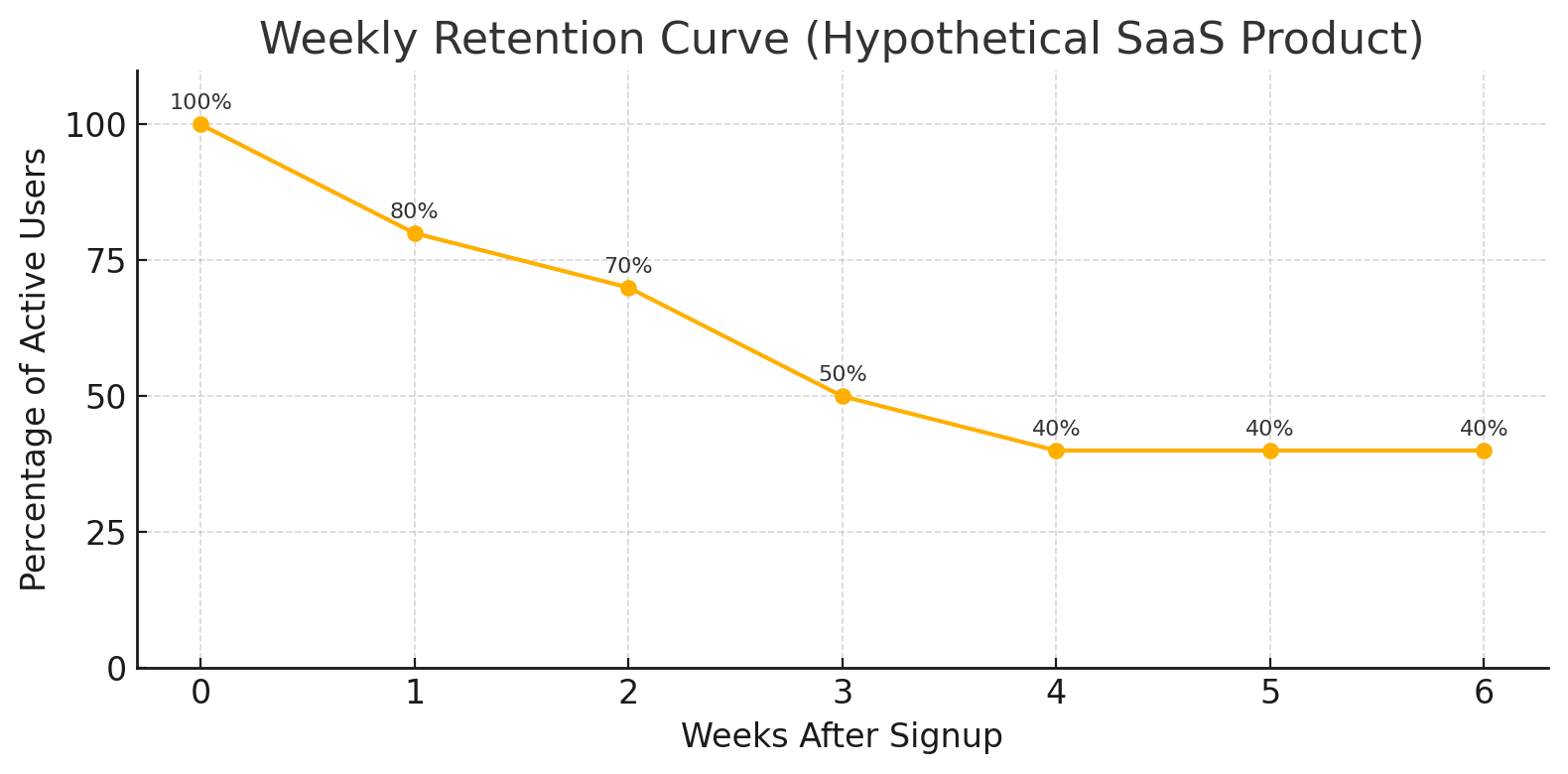
Below is a retention curve for a hypothetical B2B SaaS app. It tracks the share of users who remain active in each of the first six weeks after signup.

  • Week 0 starts at 100 % because the entire cohort has just onboarded.
  • By Week 3, only 50 % are still logging in—an attrition pattern that’s perfectly normal in most freemium or trial funnels.
  • Notice the plateau at 40 % from Week 4 onward. That flat tail is gold: it tells you a sizable slice of the cohort has found enough value to form a habit and stick around for the long-term.

Real-world parallel:

When productivity platform Notion saw its retention curve flatten at just 30 % after the first month, the CS team launched an in-app “Workspace Basics” tour that surfaces collaboration features the moment a user invites a teammate. Within one quarter, Week-3 retention climbed to 47 % and average ACV per account jumped 18 %.

The takeaway? Use early-cohort retention data to pinpoint (and replicate) your product’s “aha” moment.

Why URR Is a Critical Metric for SaaS Customer Success

In fast-scaling SaaS businesses, keeping customers satisfied isn’t enough—you need to ensure they consistently engage with the product. That’s where User Retention Rate (URR) comes in. It bridges the gap between product adoption and long-term loyalty by showing how sticky your product really is in the critical early days after onboarding.

URR doesn’t just track usage—it surfaces patterns that help Customer Success (CS) teams act early, support intelligently, and scale outcomes across their portfolio.

URR Reveals True Product Adoption

While financial metrics tell you how much revenue a customer brings, only User Retention Rate (URR) tells you how much value they’re actually getting—and when that value starts to fade. This insight enables Customer Success (CS) teams to take proactive steps before customers disengage silently.

By closely monitoring URR, CS teams can:

  • Spot declining engagement well before a churn risk escalates
  • Prioritize outreach based on user behavior, not guesswork
  • Segment users effectively for tailored onboarding and support
  • Use URR trends as an early-warning system to guide intervention

This behavioral focus empowers CS teams to shift from reactive troubleshooting to strategic account growth.

Onboarding That Drives Retention

A standout example of URR in action is Slack—a platform known for exceptional onboarding and product-led growth.

Slack focuses heavily on reducing friction during onboarding. From seamless workspace setup to intuitive feature tours, they quickly guide users to “aha” moments. According to Slack’s 2023 S-1 filing, teams that completed a four-step tutorial showed a 30 % higher URR in the first 30 days. That deliberate approach:

  • Boosts initial activation
  • Accelerates time-to-value
  • Drives higher usage retention

As a result, Slack has seen significant improvements in URR among new teams within the first 30 days—a critical period in any SaaS lifecycle.

Here’s what that translated to:

  • A spike in daily active usage
  • 98% paid user retention
  • Faster account expansion across departments and teams

For Customer Success teams, this onboarding strategy means fewer users stalling out post-signup and more reaching success milestones, which reduce early churn risk and drive long-term account value.

What ACV Is and Why It’s Essential

Annual Contract Value (ACV) represents the average yearly revenue generated from a customer contract. It’s a key metric that helps SaaS companies evaluate the financial value of each account on an annual basis, enabling smarter resource allocation, account segmentation, and long-term strategic planning.

ACV = Total contract value ÷ Number of years

Example: If a customer signs a contract worth $60,000 over 3 years, the ACV is $20,000.
This means the account is expected to generate $20,000 in revenue per year, which helps CS and revenue teams determine the level of effort and attention that account deserves.

But ACV isn’t alone in the revenue metrics universe. Look how it compares to its close cousins:

  • ACV focuses on average annualized contract value, which helps track and compare accounts across time.
  • ARR (Annual Recurring Revenue) reflects the annualized value of all active contracts, giving a snapshot of recurring revenue at a specific time.
  • TCV (Total Contract Value) includes everything in a deal—subscriptions, one-time fees, onboarding, and discounts—across the full term.

While ARR and TCV look at company-wide performance, ACV gives Customer Success teams visibility at the account level, making it a powerful lever for resource planning, forecasting, and personalization.

“Aligning CS strategies with ACV enables personalized customer journeys that significantly improve renewal rates.” – Vicky Kalbande, CEO & CS Manager at Sleek Bill

Why ACV Is a Key Driver of CS Strategy

Once ACV is calculated and tracked, CS teams can shift from generic support models to targeted strategies that match each customer’s business value.

Customer Segmentation and Prioritization

ACV allows CS leaders to move beyond industry or company size and segment customers by revenue potential:

  • High-ACV accounts may warrant tailored success plans, personal onboarding, and quarterly business reviews (QBRs) to drive retention and expansion.
  • Lower-ACV customers are better served through scalable touchpoints like in-app support, webinars, and automated messaging.

This structured approach ensures every customer gets value, but the depth of engagement reflects strategic importance.

How ACV Shapes the Customer Journey

Knowing an account’s ACV informs how and where CS teams invest their time. For example:

  • High-ACV customers may get early access to beta features or specialized onboarding tracks.
  • Strategic upsell campaigns can be timed around contract milestones, based on account value.
  • Renewal conversations become more proactive and personalized when you understand the long-term worth of the client.
  • Tracking ACV helps CS teams deliver tailored experiences that scale with the customer’s business impact.

Check out this ACV segmentation calculator to customize your own customer success strategies.

“When we see a $25k-plus ACV account, our playbook shifts from ‘support’ to ‘co-pilot.’ We schedule executive QBRs, share roadmap drafts, and embed Custify health data into every meeting deck. That partnership mindset is why our enterprise renewal rate sits above 96 %.” — Irina Vatafu, Head of Customer Success at Custify

Forecasting Revenue Through CS Impact

ACV becomes even more powerful when paired with customer health and usage data. In practical terms, this allows CS leaders to:

  • Forecast renewals based on engagement and contract size
  • Identify high-potential upsell or cross-sell opportunities
  • Report confidently to executives on revenue at risk or expansion potential

Custify simplifies this by integrating ACV into its dashboards—linking contract values with product usage, milestones, and risk indicators. This visibility lets CS teams:

  • Monitor revenue impact from key actions or behaviors
  • Set proactive alerts for contract milestones or drop-offs
  • Track ACV trends across segments, regions, or CS initiatives

With this level of insight, Customer Success becomes a growth function, not just a support role

Tying customer success metrics to real-time application performance monitoring can also reveal how backend issues like latency, errors, or slow response times subtly impact user retention and satisfaction. This layer of observability helps CS teams act faster when usage declines, providing technical context that supports smarter, more proactive interventions.

Salesforce: Tiered ACV Segmentation for Scaled CS

Salesforce sets the gold standard for customer segmentation, and ACV is at the heart of it.
Instead of segmenting by industry or company size, Salesforce assigns tiers based on Annual Contract Value:

  • High-ACV customers receive dedicated Success Managers, proactive check-ins, and strategic alignment
  • Mid- to low-ACV segments benefit from scaled CS programs like success centers, webinars, and automated journeys.

This approach ensures every customer receives value, but the depth of engagement scales with their potential—maximizing retention, expansion, and team efficiency simultaneously.

For more insights on aligning CS with business outcomes, check out our guide to critical customer success metrics, including how to operationalize ACV across your team.

How URR and ACV Work Together to Drive CS Success

Customer Success isn’t just about reacting to issues or sending satisfaction surveys—it’s about proactively managing relationships based on both behavior and business value. When you combine User Retention Rate (URR) and Annual Contract Value (ACV), you gain a powerful, data-backed view of who needs attention, when, and why it matters financially.

URR tracks how engaged users are. ACV tells you what each account is worth.
Together, they give CS teams the context to prioritize efforts, forecast accurately, and protect the business.

These two metrics help CS teams move from one-size-fits-all support to strategic, prioritized engagement that protects revenue and strengthens long-term partnerships.

Spotting Red Flags with Data

Imagine you’re managing an enterprise account with an ACV of $50,000. The contract looks great on paper. But now imagine that within that account, user engagement has dropped significantly—perhaps only a fraction of previously active users are still logging in.

This is where URR becomes essential.

While ACV tells you the account is high-value, URR shows you that product adoption is weakening—potentially across specific teams or user segments. Even if the company hasn’t canceled the contract yet, low URR signals a risk: they may not be realizing value and could churn at renewal or downsize their contract.

By pairing these metrics:

  • URR reveals declining engagement, even before a complaint arises.
  • ACV highlights the potential business impact if the account is lost or contracts are reduced.

With a tool like Custify, these insights are visible in real-time. The system can trigger alerts when usage declines within a high-ACV account, enabling your team to:

  • Investigate which users or teams have disengaged
  • Offer targeted re-engagement strategies (e.g. retraining, onboarding refresh, feature coaching)
  • Preserve the relationship before revenue is at risk

This approach transforms Customer Success from a support function into a revenue-responsible, risk-aware team that takes action with confidence.

Aligning Product, CS, and Sales

URR and ACV aren’t just for CS dashboards—they’re strategic signals that can align teams across your SaaS org.

  • URR tells the product: “Here’s what users are engaging with. Here’s where they’re dropping off.”
  • ACV tells Sales and CS: “This account has the potential to grow—or the risk to hurt.”

When high-ACV customers consistently use certain features, the product can invest further in those experiences. When enterprise clients make feature requests, ACV gives context to prioritize development efforts, ensuring your roadmap supports real revenue growth.

This alignment leads to:

  • Smarter product decisions
  • Better sales handoffs
  • CS strategies that balance effort with impact

URR fuels insight. ACV gives it weight. Together, they drive a more focused, responsive, and revenue-conscious Customer Success operation.

For scaling SaaS teams, a Sales Virtual Assistant can help bridge gaps between departments—tracking ACV data, updating deal stages, and flagging accounts with shifting URR for timely CS intervention.

Best Practices to Improve URR and Maximize ACV

In Customer Success, data is only powerful if it leads to action. Once you track URR and ACV, the next step is knowing how to move the needle—both in engagement and revenue.

Here’s how leading SaaS CS teams do it.

Improving URR

High URR doesn’t happen by chance. It’s the result of intentional strategies that guide users to value fast and keep them coming back.

1. Onboarding Playbooks

Map out key milestones for new users and build structured onboarding journeys. Playbooks ensure consistency and scalability, especially for mid- to high-ACV segments.

2. In-app messages tied to Behavior

Use in-app prompts to nudge users toward core features based on real-time actions. For example, a well-timed tooltip or checklist can be the difference between activation and abandonment.

3. Customer Training

Offer webinars, help centers, and short-form video content to support ongoing education. The more confident users are, the more likely they are to return and explore deeper functionality.

When URR rises, it indicates value delivery and opens the door to expansion opportunities.

Growing ACV

URR doesn’t just keep customers—it lays the groundwork for growth. Here’s how to turn usage into revenue expansion:

1. Identify Upsell Signals

Monitor URR alongside feature usage to determine when customers are ready for more. Consistent use of advanced features may signal a fit for premium tiers.

2. Drive Product Adoption for Multi-Seat Upgrades

If one team is active, others can follow. Use engagement insights to initiate land-and-expand campaigns. Highlight collaborative features and cross-functional benefits to encourage internal referrals.

3. Create Success Plans for Enterprise Clients

Tailor roadmaps around specific business goals. When ACV is high, aligning your strategy with the client’s KPIs shows long-term value, increasing renewal and upsell potential.

Notion’s Land-and-Expand Model

A standout example of putting URR and ACV into practice is Notion.
The productivity platform built its Customer Success engine around a land-and-expand model—relying heavily on URR data to predict account growth. They track deep usage signals like:

  • Workspace activity
  • Template usage
  • Collaboration frequency

When usage dipped, their CS teams didn’t wait. They triggered targeted messaging and training, re-engaging users with helpful content and support. As a result, customer Success teams doubled ACV within six months by intervening in the proper accounts. With the right tools—like Custify—they can feed real-time usage data directly into health scores and alert systems, ensuring they catch every opportunity and spot every risk before it escalates.

Quick Checklist for Improving URR and ACV:

  • Audit onboarding flows quarterly.
  • Track URR for every new cohort weekly.
  • Set URR drop alerts (e.g., −10 % WoW).
  • Segment accounts by ACV tiers.
  • Match CS playbooks to each ACV tier.
  • Trigger re‑engagement when URR dips.
  • Surface upsell cues in health scores.
  • Review ACV growth per segment monthly.
  • Tie CS OKRs to URR + ACV targets.
  • Share URR & ACV dashboards in QBRs.

URR Is Stickiness. ACV Is Value

Together, they give Customer Success teams a complete, data-driven picture of a customer’s engagement and financial worth.

Tracking one without the other creates blind spots. But when you combine both metrics, you unlock the ability to:

  • Spot churn risks early
  • Prioritize accounts by strategic value
  • Align CS efforts with revenue goals
  • Drive smarter onboarding, adoption, and expansion

Companies that master URR and ACV don’t just reduce churn—they create scalable, high-impact Customer Success strategies that fuel sustainable, long-term growth.
With tools like Custify, turning insight into action becomes faster, more strategic, and fully embedded into your team’s daily operations.


News
Berita
News Flash
Blog
Technology
Sports
Sport
Football
Tips
Finance
Berita Terkini
Berita Terbaru
Berita Kekinian
News
Berita Terkini
Olahraga
Pasang Internet Myrepublic
Jasa Import China
Jasa Import Door to Door

What It Means to Have a Customer Mindset


Put a few customer success managers in a room and ask them to talk about customer mindset, and they’ll probably be there for hours.

It’s funny as much as it’s true – in CS, we love to debate what it means to have a customer mindset.

To that end, for today’s article, I put together a roundup of thoughts and opinions, actionable tactics and advice on operating with a customer mindset.

What Does It Mean to Have a Customer Mindset? CS Leaders Answer

1. Anticipating Customer Needs and Helping Them Win

Having a customer mindset means you’re constantly putting yourself in the customer’s shoes. You’re not just reacting, you’re anticipating needs, spotting opportunities, and helping them win.

– Tylor Setzer-Wylie, Customer Success Engineer, Open Raven

2. Embedding Customer Perspectives into Internal Processes

Having a customer mindset means embedding the customers’ perspective into processes and workflows. It starts with understanding customers’ perspective through listening to all and analyzing their signals (social, support conversations, CSM interactions, peer community engagement, purchasing and adoption behavior). The next step is designing journeys based on this knowledge, and leveraging the customers’ perspective throughout each work step. Embedding it into processes and workflows will ensure it gets considered when designing journeys, creating enablement material, developing products/services, updating support processes, etc.

– Andrew Carothers, AI & Digital Customer Experience Expert

3. Understanding Your Customers’ Success Is Your Success

In short, customer mindset is keeping customers’ success as your success.

Example: Customer wants to have a feature to report data from the field. As a CSM, you understand the requirement, work with the product team, and bring a solution. You build it, make it live – you delivered what the customer wanted. As a CSM, you did the job well, let’s say the product went live, but the customer is not trained to use it well, mostly this feature remained unused by the customer, thus the end problem of reporting data from the field is still unsolved.

In this case, as a customer mindset, you train the end customer on the feature, make sure they are using it, and finally, they are able to collect field data.

– Ankit P., Head of Customer Success, Wayground

4. Driving the Roadmap Through Customer Outcomes

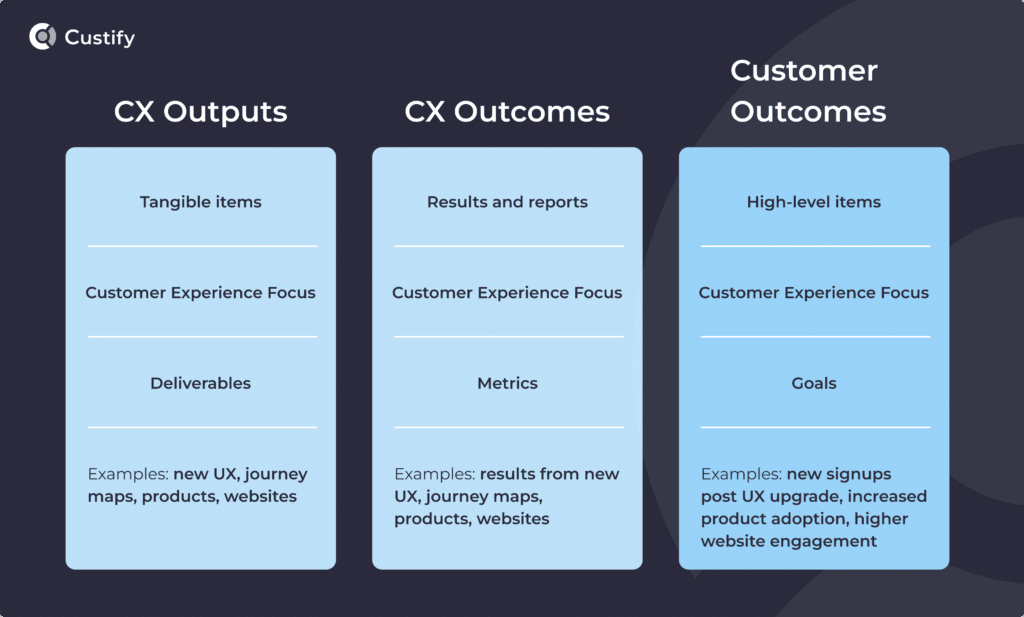
A true customer mindset means anchoring at least 80% of the roadmap to measurable customer outcomes.

At Custify we learned this the hard way: a fintech client’s onboarding took 14 days. Instead of polishing two UI “nice-to-haves,” we shipped pre-built data-mapping templates.

Results: time-to-first-value fell to 3 days, feature adoption rose 35 %, and net revenue retention climbed 7 points in one quarter.

Every sprint now opens with three questions:

  • Which concrete customer pain does this solve?
  • How will we measure impact in the first 30 days?
  • What internal blocker must we remove to ship fast?

If a story can’t answer all three, it gets parked, no matter how “brilliant” it sounds in a workshop.

– Philipp Wolf, Founder & CEO, Custify

cx outputs vs cx outcomes vs customer outcomes

5. Conducting Thorough Market Research

It is crucial for businesses to invest in market research to anticipate and understand customer needs. The ability to read the customer’s mindset allows for meaningful innovation and problem-solving. Customer satisfaction is the ultimate goal, and success in achieving it depends on fulfilling customer desires in a timely and data-driven manner. Entrepreneurs should make it a priority to become adept at understanding their target market’s mindset to ensure the success of their endeavors.

– Uwera Steven, Business Strategist, Operations Manager, Afrinnovators Group Ltd, Understanding Customer Wants for Business Success

6. Following the Scientific Approach

The key is understanding how your customers think. Organisations need to better analyse their data to really understand their customers’ mindsets and thinking patterns to better engage with them. Going beyond the insight delivered through demographic or behavioural targeting is a game changer.

This sounds straightforward, but how can we understand customer mindset? Using neuroscience allows us to capture real data on decision making as it relates to a particular situation. This kind of data allows you to understand precisely how and why individuals are making decisions and use this to influence their next decision.

There are three elements to consider when understanding mindset:

  1. Demographics: the study of a population based on common characteristics such as age, gender, income and education.
  2. Psychographics: the qualitative study of people based on their expressed attitudes, values, beliefs and behaviours.
  3. Sociographics: the study of the individual and the way they approach their decision making, such as personal needs, profile, attitudes and passions.

By bringing together all three you can identify the consumer’s mindset to deliver actionable insights.

– Andrew Aitken, Head of Business Development & Customer Success @ SERV, Understanding your customers using the science of mindsets

7. Using Psychological Information to Personalize Offers

Understanding customer mindset can help you identify degradation in economic performance because you’ve organized people according to mindset as opposed to media definitions. What your product is accomplishing for different groups of people can be discovered by understanding not just why people buy but who they are. For example, one group of people may love your product while another group might require a discount to be interested. The level of discounting and ultimate acquisition cost is most likely connected to just how different these groups are psychologically. It’s not just a blanket statement but it can be quantified.

– Christopher J Skinner, CEO @ Stealth Dog Labs, How Understanding Customer Mindset Can Help Your Business Mode

8. Budgeting for the “Success Gap,” Not the Renewal Date

We tag every account with a “next-aha” milestone—the exact action users must complete to feel value, then budget enablement right there: a 5-minute Loom, an API snippet, or an in-app walkthrough.

When product telemetry showed power users exporting raw CSVs five times a week, we launched pivot reports plus CSM-led micro-workshops.

Outcomes: exports dropped 60%, in-app report use jumped 42%, and churn in that cohort fell 18%.

If you wait for QBRs to surface blockers, you’re already negotiating discounts. Instrument your product to surface gaps in real-time, and empower CSMs to close them before customers even feel friction.

– Irina Vatafu, Head of Customer Success, Custify

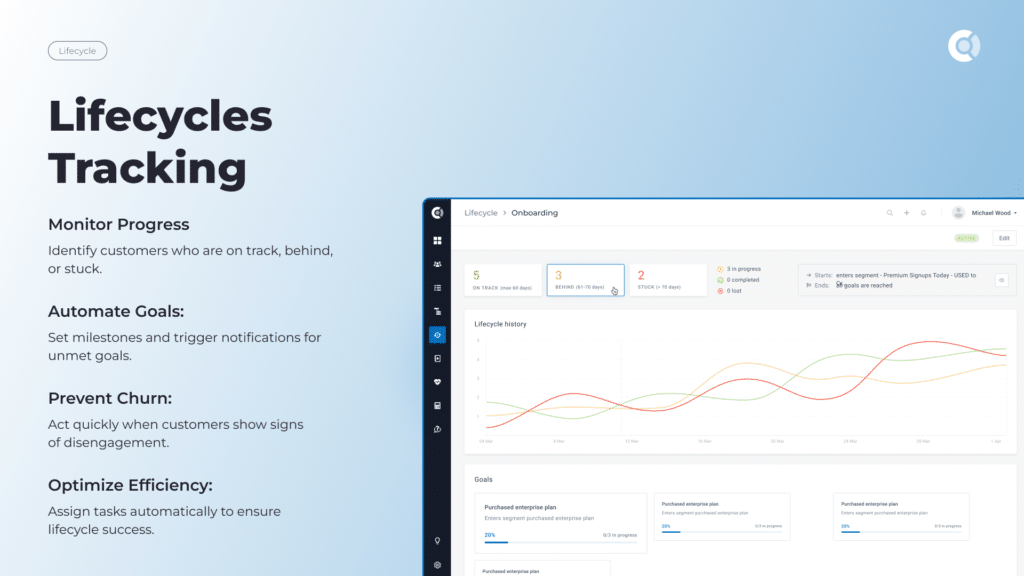
lifecycles trackinglifecycles tracking

Should You Adopt a Customer Mindset in Your Organization

Having a customer mindset is not simply useful, it’s becoming essential. We’re increasingly seeing that companies that prioritize customer success invariably boost their own success. The 2025 State of Customer Experience shows personalization is a key factor in driving customer loyalty, and it’s only set to grow with the use of AI for customer retention.

Key Benefits of a Customer Mindset

  • Let’s recap some of the benefits of operating with a customer mindset.
  • Anticipating opportunities and helping customers reach their goals.
  • Optimizing your customer journey and internal processes for CS.
  • Understanding when to go the extra mile in customer interactions.
  • Analyzing customer success through measurable customer outcomes.
  • Learning as much as possible about your customer base.
  • Following a scientific approach to customer relationship management.
  • Optimizing your budget for optimal success delivery.

If you want a tool and an ally that can help you get focused on your customers’ goals, schedule a demo with us today. Custify can help with personalized work sessions and concierge onboarding designed to put your needs and the needs of your customers at the center of our joint strategy.


News
Berita
News Flash
Blog
Technology
Sports
Sport
Football
Tips
Finance
Berita Terkini
Berita Terbaru
Berita Kekinian
News
Berita Terkini
Olahraga
Pasang Internet Myrepublic
Jasa Import China
Jasa Import Door to Door
How to Conduct a Customer Needs Analysis


A customer needs analysis can offer you a treasure trove of information.

It can also lead you astray.

72% of customers value being listened to and understood (Genesys State of CX). But how do you make sure you’re listening for the right signals? It’s all in how you do it. Many online methodologies promise the moon while giving you very little in specifics when it comes to actually performing such an analysis. So, let’s clear the air and find out:

  1. What a customer needs analysis is and what it entails
  2. What customer needs and wants you’re looking to identify
  3. The types and categories of customer needs, along with examples
  4. How to put together a strategy for finding them
  5. How to fulfill those desires with your product or services

What Is a Customer Needs Analysis?

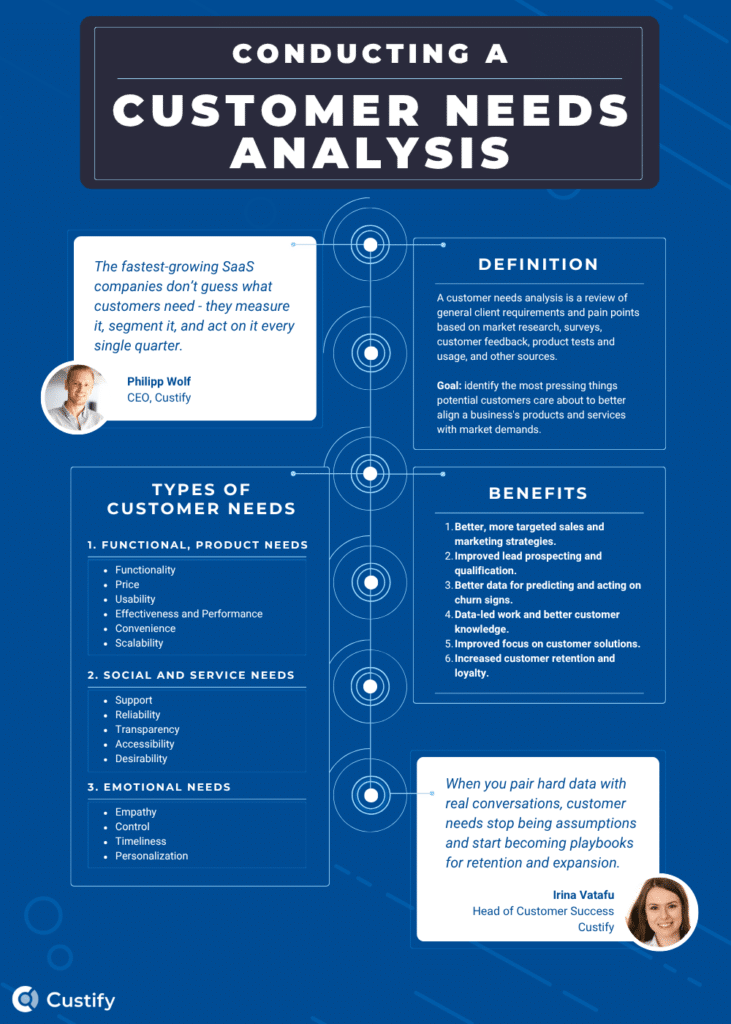
Simply put, a customer needs analysis is a review of general client requirements and pain points based on market research, surveys, customer feedback, product tests and usage, and other sources. The goal of this analysis is to identify the most pressing things potential customers care about in order to better align a business’s products and services with market demands.

What Are Customer Needs?

Simply put, customer needs represent the things potential customers care about that lead them to a purchase decision. These needs don’t all have to be directly related to the product or service they end up buying, but they can be used to inform the process and fine-tune customer experience.

Types of Customer Needs

Typically, customer needs fall into a few categories. Let’s explore each one with some examples along the way.

Functional and Product Needs

When looking for a solution, customers often have very specific requirements in mind. We call these functional needs or product needs if they refer to specific product features or performance.

  • Functionality. What the product can do.
  • Price. How much your product/services cost.
  • Usability. How easy the product is to use.
  • Effectiveness and Performance. How effectively the product performs.
  • Convenience. How convenient it is to use the product.
  • Scalability/lifespan. How easy it is to scale usage and how long the customer can envision themselves using your solution.

Social and Service Needs

Conversely, customers will always have demands regarding the level of service and the type of support they receive, including facets like how transparent you are and how readily accessible their assigned CSM is – if you’re not able to respond to their requests in a timely manner, you may lose points in their eyes and increase the likelihood of churn when the renewal period comes around.

  • Support. How easy it is to get hold of support and how well they handle requests or questions.
  • Reliability. How reliable the product or service is.
  • Transparency. How transparent the company is about pricing, data usage, and other factors.
  • Accessibility. How accessible the product is for all categories of people.
  • Desirability. How much they want to continue to use the product or services provided.

Emotional Needs

Beyond even product and service needs, customers often have emotional needs that even they might not even recognize. These stem from basic human decency (which often eludes some customer service interactions) to very personal needs, specific to each customer.

  • Empathy. How empathetic the company representatives are (lead CSM, support agents, etc.)
  • Control. How much customers can control both the social and the technical aspects of the product or service they’re paying for. This includes, for example, both product customization and QBR frequency.
  • Timeliness. How quickly requests receive a reply and how quickly they’re solved. While equally important, both are usually judged separately.
  • Personalization. The number of customization options the customer has inside the product.

Why Use a Customer Needs Analysis?

  • Better, more targeted sales and marketing strategies. By understanding customers’ needs, both teams can better polish their messaging and design better strategies for reaching their ideal audience.
  • Improved lead prospecting and qualification. Your sales team will also thank you for a proper customer needs assessment. With the proper tools in hand, they can better prospect leads, sift out those with high churn scores, and refocus their efforts on those that have the best chance to convert into long-term, loyal, or high-MRR customers.
  • Better data for predicting and acting on churn signs. If you know what customers need, you also know what they want to avoid. In any relationship, it’s helpful to know the risks and be prepared to face them. Similarly, with customer relationships, knowing the risks means you can set up a proactive customer engagement workflow that helps you see any sign of churn and act on it.
  • Data-led work and better customer knowledge. Without a needs analysis, you’d be operating on incomplete data, hunches, and baseless assumptions. So many times in business, having the hard proof required to make a decision will set you on the path to success. Knowing your customers’ wants and desires is a fundamental step in the right direction.
  • Improved focus on customer solutions. Armed with this knowledge, you can refocus your product to better serve your customers. The data you gather will ensure that every time you need to make a decision, you’re prepared to support your choice with facts.
  • Increased customer retention and loyalty. Overall, customer needs analyses, through their many benefits, lead to increased customer retention and loyalty. They’re a good way to ensure you’re building a healthy customer base that actually receives value from your product.

customer needs analysis infographic

How to Conduct a Customer Needs Analysis? 3 Methods

There are three key pillars for conducting a customer needs analysis. When used together, they yield a clear and actionable picture of your audience, allowing you to tailor your product and services to ensure long-term retention and loyalty.

1. Research – Review Customer Data and Identify Trends, Patterns

First, research as much as possible:

  • Data collection. It all starts with adequate data collection methods. You need multiple avenues to collect the most important data points with regard to your potential customers. Look at the state of the market, make a list of what customers want when they first get in touch, but also look at current customers. Use health scores to determine which customers were successful and make a note of how that success happened.
  • Customer journey analysis. Do a deep dive of your customers’ journeys, go for a granular approach, and identify where things are going right, what customers seem to be doing, and how they’re using your product or service to fulfil their goals. You might be very surprised at what you find during this stage of your analysis.
  • Data visualization. Next stop – centralization. You need to have every relevant datapoint in one play. To do this effectively, I recommend using a single tool where you can unite the data streams into clear dashboards, such as with Custify’s customer success 360 view.
  • Customer segmentation. Lastly, all this research should help you clearly identify customer cohorts, which you can then sort into segments. You can then determine the needs of each segment, making it possible to design custom solutions and services for different categories of customers.

2. Discuss – Hold Regular Calls with Customers and Ask about Issues

Secondly, take advantage of all customer communications:

  • Great customer service. A cornerstone of understanding customer needs is actually providing great customer service. Why? Because that means listening – not just performatively, but actively paying attention to what customers say and jotting down their responses and preferences. This is a surefire way to find what they most care about.
  • Direct customer communication. Speaking directly to your customers, not simply as part of service interactions, can reveal a lot about their preferences. Think: sales calls, onboarding calls, CSM check-ins, QBRs – all of these and more are effective touchpoints for analyzing customer needs. Before each call, sit down and ask yourself two things: how you can bring value to the call, and what to ask so you’re prepared to deliver even more value next time.
  • In-app customer feedback. Now, regardless of how many times you talk to your customers directly, there may be some things better left for text forms, surveys, or other forms of written communication. That’s where in-app forms and customer surveys play a key role – presenting clients with a way to voice their opinions and concerns in contextual menus next to the specific thing they’re providing feedback on.
  • Managing customer expectations. Customers rarely know precisely what they want – they often have a feel for what they think they want and that may indeed reflect their actual needs, but they may not have the language or experience to voice that need accurately. It’s the job of the lead CSM to not only manage customer expectations and decipher what the customer is saying, but also be prepared for future clients using the same verbiage. If you fail to properly understand those needs, it can lead to knowledge gaps that can severely undermine business growth.

List of Survey Questions to Understand Customer Needs

Here are some examples of questions you can pose to zero in on customer needs.

  1. What’s the hardest part of achieving your goal right now?
  2. If our product disappeared tomorrow, what would you miss first?
  3. Are our products’ features working as intended?
  4. If you could add one feature to our product that would make your life easier, what would it be?
  5. If you could rework one of our features to better fit your needs, what would it be and how would you rework it?
  6. What issues do you expect our product to solve?
  7. What are your overall company goals?

3. Test – Use the Product to Simulate Customer Use Cases

Lastly, use all the data you gathered thus far to simulate customer use cases. Then, try your own product with those use cases in mind, trying to be aware of subjective biases.

  • Product capabilities. Start by testing basic product features – see what works, what doesn’t, and what actually helps or hinders you in reaching your goals. Note the ways in which you can improve those features and any friction points you encounter along the way.
  • Business processes. Testing internal business processes might seem a bit silly sometimes, but it can help you make sure your CSMs are equipped to deal with complex customer escalations when the time comes.
  • User experience and product adoption. During these tests, pay close attention to UI, UX, and elements that typically aid in product adoption. Users’ first-time experience is critical to long-term retention and success, and should be treated as such.
  • Self-service options. Lastly, test how users could access self-service options, if those exist within your product, and whether or not these actually help resolve issues and prevent escalations.

❗️Reminder: Data Validation and Hygiene are Essential

Throughout the process of conducting a customer needs analysis, make sure you observe fundamental data governance and hygiene practices. Validating data streams, integrating all the tools at your disposal, and performing regular cleanups should all be part of your analysis.

Optional: Use an Existing Methodology for Needs Analysis

While these are the fundamental principles of customer needs, there are other methodologies that offer a more theoretical framework for capturing customer needs.

Such methodologies include:

  • The Jobs-to-be-Done Framework. A simple method developed by Tony Ulwick, fundamentally rooted in driving outcomes for customers by understanding market needs. This methodology dives deeper into consumer psychology, often becoming highly theoretical. I personally like this approach, but it may be overly complex for small startups.
  • The Agile User Stories Methodology. A subset of the agile methodology, user stories are simple, informal explanations of product features viewed from the perspective of the customer. If a particular feature can’t be imagined through a user story, then it cannot deliver value to a customer and must therefore be scrapped. This method’s biggest weakness is that it doesn’t look at customers directly. Instead, it’s more of a product-focused approach.
  • The Kano Model for Feature Prioritization. Another product-focused approach is the Kano (Kah-no) Model. It divides product features into basic, excitement, and performance features. Basic features are expected for the product to compete in its market. Excitement features aim to deliver customer delight – literally amazing customers. Performance features are those that grow user satisfaction the more money you spend on them, such as cloud storage space or the number of contacts per account. While functionally sound, the Kano Model also does not look directly at customer needs but instead takes a broad approach.

Fulfilling Customer Needs – Your Strategy for Success

  1. Use customer segments efficiently. The benefits of customer segmentation go far beyond simply organizing your customer base and making work more efficient. You’re first of all gauging customer needs better, and second of all, you’re then able to fully customize your engagement strategy for each cohort. Essentially, it lets you provide bespoke solutions that actually bring in value and deliver results.
  2. Create an ideal customer profile (ICP). Through all of this data that you’ve gathered, you can now build an ideal customer profile or ICP. You can then use it to optimize your sales and marketing, improve your messaging, and make sure the customers that do come in match that ICP as much as possible, allowing you to scale because you’ll already have everything in place to serve them in the way that they want.
  3. Personalize customer experiences. Making customers feel special is the name of the game, and we’ve seen just how powerful AI can be in delivering those essential, custom-built experiences. Using AI for customer retention tactics like personalized support is one of the key ways the current business landscape is evolving.
  4. Align pricing with customer value expectations. A lot of products fail because customers don’t see the value of paying an X amount of dollars for a product that only serves a specific function. They may see the value in that, but they may not be able to justify the cost. To effectively gauge this, use surveys during your market research and ask your existing customers how they feel about the pricing. Then, take a hard look at your pricing strategy and don’t be afraid to make dramatic changes if it means keeping your business afloat. A consistent stream of new customers is better than an ungodly amount of churn when renewal comes around.
  5. Optimize customer onboarding. The third most common reason for churn is poor onboarding, so once you have a full list of customer needs, one of your key priorities should be your onboarding flow. Use the info you’ve gathered to customize the flow to your customers’ or segments’ needs.
  6. Ensure alignment and create feedback loops. Knowing your customers’ needs does nothing for you if you keep it to yourself. Instead, you should share any new findings with the entire organization and customer-facing teams in particular. As part of this effort, consider creating customer feedback loops whereby customers who provide highly relevant and actionable feedback have their requests forwarded to the right person, with CSM visibility. Once these issues have been solved or upgrades have been implemented, the original customers who provided that feedback should be brought back into the loop.
  7. Monitor, measure, evaluate, and improve. Lastly, once you have your ideal flow for customer needs analysis and fulfilment, you should continue to monitor client activity in your customer success software and look for potential improvements. Both your product and your customers’ expectations will evolve over time; it’s best to stay ahead of the wave and use it as an opportunity to improve.

Using a Customer Needs Analysis with Custify

Once you have your full analysis and understanding of customer needs, it’s time to get to work. That means creating new solutions, prioritizing customer engagement, and automating as much as you can.

One tool that can help you with that entire process is Custify. Schedule a demo with our team, and we can chat about your goals, figure out ways to reach them, and guide you through the next steps. And the best part? You don’t need to commit to anything.

Our foremost goal is your success, so let’s tackle your customers’ success together!​​


News
Berita
News Flash
Blog
Technology
Sports
Sport
Football
Tips
Finance
Berita Terkini
Berita Terbaru
Berita Kekinian
News
Berita Terkini
Olahraga
Pasang Internet Myrepublic
Jasa Import China
Jasa Import Door to Door

Slot Online Telkomsel: Main Slot Tanpa Aplikasi Tambahan

Kini bermain slot online semakin mudah dengan Telkomsel. Tidak perlu repot mengunduh aplikasi tambahan atau memenuhi ruang penyimpanan HP-mu. Cukup buka situs slot melalui browser, isi pulsa Telkomsel untuk deposit, dan langsung nikmati keseruan permainan slot favoritmu kapan saja dan di mana saja.

Keunggulan Main Slot Tanpa Aplikasi Tambahan:

  • Praktis & Cepat: Langsung akses dari browser tanpa instal aplikasi.
  • Anti Ribet: Tidak perlu verifikasi panjang atau top up e-wallet.
  • Aman & Terpercaya: Transaksi menggunakan provider resmi.
  • Fleksibel: Bisa dimainkan dari HP, tablet, atau laptop tanpa hambatan.

Dengan cara ini, fokusmu hanya pada keseruan bermain dan peluang jackpot, tanpa harus khawatir soal instalasi aplikasi tambahan.

Mulai Main Sekarang! Cukup buka browser, isi pulsa Telkomsel, deposit, dan rasakan kemudahan bermain slot online tanpa aplikasi tambahan! slot deposit pulsa telkomsel

Tiger Reserves In India: Every Detail You Need To Know


Posted on By Flying Squirrel Holidays

India has more than 50 tiger reserves, making it the best place to go on a tiger safari. The country is the global leader in tiger conservation and the hilly lands of Ranthambore, the thick forest in Bandhavgarh, the wild species of Tadoba National Park and Chandrapur are the unique highlights. 

A tiger safari in India is not something you would define as a vacation, but rather an opportunity to be part of one of the most successful conservation projects in the world. About three-fourths of the world’s tigers are located in India; thus, India, which accounts for more than 75 per cent of the world’s tiger numbers, is on the number one list in the world, regarding tiger tours in India. 

Visitors can experience the best tiger safari tours in India through customised journeys, luxury experiences and family-friendly tiger safari packages.

Also read: National Parks in India: A comprehensive guide – Flying Squirrel Holidays

A quick chart on the tiger reserves in India

Reserve Nearest Access Highlight Tiger Sighting Chance Best For
Ranthambore (Rajasthan) Jaipur Airport (180 km), Sawai Madhopur Railway Station Old fort inside the park, rugged cliffs High First-time safari goers, history lovers
Bandhavgarh (Madhya Pradesh) Jabalpur Airport (200 km), Umaria Railway (35 km) Ancient fort, highest tiger density Very High Wildlife photographers, serious safari fans
Kanha (Madhya Pradesh) Jabalpur Airport (165 km), Gondia Railway (145 km) Inspiration for The Jungle Book, barasingha deer Medium to High Couples, nature lovers
Jim Corbett (Uttarakhand) Pantnagar Airport (80 km), Ramnagar Railway (12 km) India’s first national park, riverside landscapes Medium Bird watchers, adventure seekers
Pench (Madhya Pradesh/Maharashtra) Nagpur Airport (92 km), Seoni Railway (30 km) A mesmerising jungle ambience Medium Families, offbeat travelers
Kaziranga (Assam) Jorhat Airport (97 km), Furkating Railway (75 km) UNESCO World Heritage Site, one-horned rhinos Moderate Families, culture + wildlife lovers
Tadoba (Maharashtra) Nagpur Airport (140 km), Chandrapur Railway (45 km) Teak forests, lakes, wild dogs High Dedicated tiger lovers
Nagarhole (Karnataka) Mysore Airport (95 km), Mysore Railway (80 km) Kabini River, elephants, leopards Medium Nature lovers, luxury lodge stays
Bori Satpura (Madhya Pradesh) Bhopal Airport (150 km), Itarsi Railway (70 km) Oldest forest reserve, eco-tourism hub Moderate Eco-tourist, offbeat travelers
Sundarbans (West Bengal) Kolkata Airport (100 km), access by road + boat World’s largest mangrove forest, swimming Royal Bengal tigers, saltwater crocodiles Low–Medium Adventure seekers, offbeat travellers, nature lovers

Jump to sections

Top 10 tiger reserves in India you should visit

If you’re planning a tiger safari in India, choosing the right reserve can make all the difference. Some places may be famous due to regular tiger sightings, while others may astonish you with their great diversity and divine natural beauty. 

Ranthambore Tiger Reserve, Rajasthan

Tiger Reserves in India: Every detail you need to know

Ranthambore is one of the most popular destinations for a tiger safari in India, famous for its unique blend of wildlife and history.

  • Location and access: Located in Rajasthan, about 180km away from Jaipur. The nearest airport is Jaipur International Airport (3.5-4 hrs by road). The nearest railway station is Sawai Madhopur (15 km).
  • Unique highlights: The thousands-of-years-old Ranthambore Fort located within the park is a must-visit, as well as the forests and the lakes.
  • What to expect on a safari: There is a high chance of seeing a tiger. Safari is done in open jeeps or canter. You can see leopards, sloth bears, crocodiles, and numerous birds as well.

“The ruins of the Ranthambore Fort look really stunning and we were really lucky to see the famous tigress Arrowhead. It was a goosebump-worthy moment.” – Runa Ray, Singapore.

Bandhavgarh Tiger Reserve, Madhya Pradesh

Tiger Reserves in India: Every detail you need to know

Bandhavgarh is one of the best places for a tiger safari in India. It has the highest density of tigers, so many travelers call it the best tiger sanctuary in India.

  • Location and access: It is located in Madhya Pradesh. The closest airport is Jabalpur (200 km), and the closest railway station is Umaria (35 km).
  • Unique Highlights: Ancient Bandhavgarh Fort with its rich history. The park has a highly scenic landscape as it is a mix of hills, grasslands, and dense forests.
  • What to expect on a safari: There are very high possibilities of seeing tigers, particularly during morning trips. The best exploration should be made by jeep safaris. In addition to tigers, one can also see leopards, wild dogs, deer, among many others, and more than 250 bird species.

“It was sometime in April. Pretty hot and we were hoping to spot a tiger all morning. Just when we had given up hope she emerged with her two cubs from behind the tall grass.” – Monica Sethi, India.

Also read: Exploring the Wild: Unleashing the Thrills of Jungle Safari in West Bengal – Flying Squirrel Holidays

Kanha Tiger Reserve, Madhya Pradesh

Tiger Reserves in India: Every detail you need to know

Kanha is often called the best tiger reserve forest in India. It inspired Rudyard Kipling’s The Jungle Book. It is one of the most scenic tiger touring spots in India.

  • Location and access: It is situated in Madhya Pradesh. The closest airports to reach are Jabalpur (165 km) and Raipur (250 km). The nearest railway station is Gondia (145 km).
  • Unique highlights: Meadowing, sal forest and exotic wildlife such as the hard ground barasingha (swamp deer).
  • What to expect on a safari: Medium to high tiger sightings chance. Most people prefer jeep safaris but canter safaris are available as well. Kanha tiger reserve is perfect for Indian tiger safari holidays with family or friends.

While in Kanha the most memorable moment was spotting a leopard. It didn’t look anything like the black panther Bagheera from Jungle Book but we were elated nevertheless.” – Juneid Alam,  India. 

Jim Corbett Tiger Reserve, Uttarakhand

Tiger Reserves in India: Every detail you need to know

Jim Corbett is the first national park of India and is a must visit for someone who wants to do a tiger safari tour in India.

  • Location and access: This is situated in Uttarakhand. The nearest airport is Pantnagar (80 km), and the closest railway station is Ramnagar (12 km).
  • Unique highlights: The Ramganga River, the Himalayan foothills, and a vast extent of wildlife are some of the reasons why it is very special. It is also the place for bird watching different species of birds.
  • What to expect on a safari: Expect medium chances of seeing tigers, but then the safaris around here are more about the ambiance than it is about the animals. Jeep and canter safaris can be done. Other animals that tourists get to see include the elephants, leopards, gharials, and birds.

We saw a couple of tigers but what took our hearts was an elephant herd with three baby elephants in it.” – Luigi Guitores, Australia.

Pench National Park, Madhya Pradesh

Tiger Reserves in India: Every detail you need to know

Pench is an unexplored jewel of tiger safari in India. Its teak forests, meandering rivers and thriving wildlife make it one of India’s most enchanting safari destinations. It is becoming a popular pick for travelers looking for Pench jungle safari packages.

  • Location and access:  It spans over Madhya Pradesh and Maharashtra. The closest airport is Nagpur (92 km), and the closest railway station is Seoni (30 km).
  • Unique highlights: Pench River flows through the park, hence the park is very scenic. It also has a great population of wild dogs and leopards.
  • What to expect on a safari: The chances of seeing a tiger are medium. The most efficient way to explore is to have a jeep safari. The views are beautiful and often less crowded compared to other parks, making it a peaceful choice for Indian tiger safari holidays.

“I have been to Africa but Pench wasn’t anything I expected. The chirping birds, the roar of a tiger, the sounds of the forest made it an enchanting experience. On the last day we spotted 4 tigers and two leopards.” – Mac Brown, US.

Read more: Wildlife Tourism in India: Safari Adventures and National Park Delights – Flying Squirrel Holidays

Kaziranga Tiger Reserve, Assam

Tiger Reserves in India: Every detail you need to know

Kaziranga is a famous place in the world because it not only has tigers but also one-horned rhinos. It is a special destination when you want to combine a tiger safari in India with other wildlife activities.

  • Location and access: It is situated in Assam. The closest airport is Jorhat (97 km), and Furkating railway station (75 km).
  • Unique highlights: Kaziranga is a UNESCO World Heritage site and is home to a variety of wildlife, including rhinos, wild water buffalo, elephants, tigers, and swamp deer.
  • What to expect on a safari: Moderate chances of seeing tigers, but very good chances of seeing a wide variety of wildlife. Jeep safaris can be done, even an elephant-back safari is available. It is among the most extensive parks for tiger tours in India.

“We stayed at a luxe safari lodge by the river and we could see elephants bathing in the river. The one-horned rhino was everywhere. We saw pug marks of a tiger but didn’t spot it.” Alexander Mitchell, UK. 

Tadoba-Andhari Tiger Reserve, Maharashtra

Tiger Reserves in India: Every detail you need to know

Tadoba National Park, Chandrapur, is often called the Jewel of Vidarbha and is one of the hidden spots for a tiger safari in India. Many tourists consider it an alternative to the larger and crowded parks.

  • Location and access: It is situated in the Chandrapur district of Maharashtra. Nagpur airport is the nearest (140km), and the Chandrapur railway station is the nearest (45km).
  • Unique highlights:  It is home to beautiful teak forests, lakes, and animals. It is also one of the best places to see wild dogs and sloth bears.
  • What to expect on a safari: There are high probabilities of tiger sighting, particularly around Tadoba Lake and Telia Dam. Jeep safaris are the ultimate way to explore. 

“Tadoba is such a beautiful place it kind of transported us to a different world. We had gone in the peak of summer and it was so much fun to see the tigers bathing in the lakes.” – Julia Conway, US.

Sundarbans Tiger Reserve, West Bengal

Tiger Reserves in India: Every detail you need to know

The Sundarbans is the largest mangrove forest in the world and one of the most unique places for a tiger safari in India. Unlike other reserves, Royal Bengal Tigers are frequently spotted here. So one sees this special wildlife experience as a once-in-a-lifetime experience.

  • Location and access: It is located in  West Bengal, approximately 100km away from Kolkata. The closest airport is the Kolkata airport, and from the park can be reached by road and boat rides.
  • Unique highlights: It is home to the Bengal tiger and the largest mangrove forest in the world. Other than tigers, one can find saltwater crocodiles, fishing cats and other rare birds. It is very unique because it is a mix of water channels, islands and forests.
  • What to expect on a safari: Tiger sightings are not very frequent but very exciting. Instead of going on jeeps, the safaris are done on boats, hence a unique adventure. This is one of the finest tiger reserves in India that offers something unique to travellers.

“The day-long launch cruise was very enjoyable. We spotted a number of crocodiles basking in the sun. We took a smaller boat and went inside a channel deep into the dense jungle. It was really thrilling.” – Aishani Mallick, Dubai.

Nagarhole Tiger Reserve, Karnataka

Tiger Reserves in India: Every detail you need to know

Part of the Nilgiri Biosphere Reserve, Nagarhole is one of South India’s best-kept secrets for India tiger safari holidays.

  • Location and access: Located in Karnataka. The closest airport is Mysore (95 km), and the closest railway station is Mysore (80 km).
  • Unique highlights: There is an abundance of lush forests, rivers, and herds of elephants, as well as tigers. It also has several leopards and wild dogs.
  • What to expect on a safari: While the chances of spotting a tiger are moderate, the real highlight is the unique combination of landscapes and wildlife. Jeep safaris and boat rides on the Kabini River are key attractions that make a tiger safari tour in India truly memorable.

“The sunset on the Kabini River was absolutely breathtaking. What I really liked was the reserve was not crowded and there were very few safari jeeps. The animals in the park have a very peaceful place to thrive.” – H. Ishida, Japan

Bori-Satpura Tiger Reserve, Madhya Pradesh

Tiger Reserves in India: Every detail you need to know

The Bori-Satpura is one of the oldest forest reserves in India and is slowly gaining ground as an alternative destination area for tiger safari packages in India.

  • Location and access: It is situated in Madhya Pradesh, which is near Hoshangabad. The closest airport is Bhopal (150 km) and railway station is Itarsi (70 km).
  • Unique highlights: Less crowded, tranquil and more suited for eco-tourism. Covered with grasslands, valleys, river basins and a high diversity of wildlife.
  • What to expect on a safari:  Fair probability of seeing tigers, although best for seeing leopards, sloth bears, and more than 300 varieties of birds. Jeep safaris and walking safaris are both popular here, making it ideal for those who want a different kind of tiger safari in India.

‘I love to click photos of birds. I clicked around 50 different kinds of birds. It was such a fulfilling trip.” – Margaret Hisham, UK. 

If you are planning a tiger Safari in India just give us a call and let us organise flights, stays, permits, tours…everything for you!. 

Tiger Reserves in India: Every detail you need to know

Best time to visit

Tiger Reserves in India: Every detail you need to know

The best time for a tiger safari in India is from October to June, when most national parks are open for visitors. The parks are closed in the monsoons (July to September) in order to give the forests a rest and recover. Also rain makes the forests muddy, there are chances of waterlogging and animals are not easy to spot. 

Winter (October- February): The climate is pleasant and thus it is a good season to visit with your family. This is the perfect season for relaxed India tiger safari holidays.

Summer (March – June): Though hot, this is considered the best time for tiger safaris in India. Tigers and other animals move around to drink water in lakes and rivers, hence the visitor has a great probability of seeing them.

Monsoon (July – September): Mostly parks are closed, but during this season, the forests are green. Some buffer zones are left open, although tigers are rarely spotted.

The ideal time to do your tiger safari tours in India is during winter, when it is comfortable, or during summertime, when your chances of sighting a tiger are high.

Luxury tiger safari stays

Tiger Reserves in India: Every detail you need to know

A luxury tiger safari in India is not only about seeing tigers. It is also about staying in opulent jungle lodges and boutique resorts, which are in the lap of nature but provide all kinds of comfort and amenities. Some of the finest stays in the tiger reserves in India are as follows:

  • Aman-i-Khhas, Ranthambore (Rajasthan): These are large luxury tents that offer a view of the Ranthambore National Park. You also have delectable food and spa service. International travellers could experience ultimate luxury here on a safari in India. 
  • Mahua Kothi, Bandhavgarh (Madhya Pradesh): A Taj Safari lodge offering simple village style stay. But once you walk into a room you would know what luxury is all about. 
  • Banjaar River, Kanha (Madhya Pradesh): Environmentally-friendly luxury tents come with all luxurious amenities.
  • The Oberoi Vanyavilas, Ranthambore (Rajasthan): One of the most famous resorts for a luxury tiger safari in India, perfect for couples on an India tiger safari holiday.
  • Pench Tree Lodge, Pench (Madhya Pradesh): You can have the extraordinary experience of staying in a tree house inside a forest. Perched atop a tree enjoy the grandeur of a well done-up room and sit in the balcony and watch life in the jungle pass by. 
  • The Serai Kabini, Nagarhole (Karnataka): A relaxing lodge on the banks of a river with great possibilities to spot wildlife close to the Kabini backwaters.
  • Diphlu River Lodge, Kaziranga (Assam): A lodge situated near the river, with only a few rooms, very private and it has also had royal visitors.

If you want the best tiger safari in India with comfort and nature, these luxury lodges will make your trip very special.

Check this: Forest Bathing in India: Explore the healing power of the woods  – Flying Squirrel Holidays

Ethical tiger safari and how you can do it

Tiger Reserves in India: Every detail you need to know

An ethical tiger safari in India means enjoying the thrill of spotting the big cat while making sure we respect the jungle and its wildlife. It is all about being the visitor in the tiger’s home, and nothing but your footprints remain there.

Safari etiquette:

  • Speak softly: Speak quietly and avoid making any excessive noise that the animals can be distracted by.
  • No littering: Leave everything you carried along and take back- even the plastic and food wrappers can cause harm to the forest.
  • Respect distance: Avoid requesting the drivers to get so near to the tigers or other animals. It is preferable to observe them from a long distance.
  • Photography tips: When you are taking photographs, put flash off so that animals are not disturbed.
  • Right clothes: Wear clothes that help you blend with the forest and do not use strong perfumes. 

By taking these minor steps, travellers can have the best tiger safaris in India and contribute towards the preservation of these beautiful forests so that they can benefit future generations.

Beyond tigers

Tiger Reserves in India: Every detail you need to know

A tiger safari in India is thrilling, but the forests are also home to many other incredible species and unique experiences.

Other wildlife: In addition to the tiger, you stand a chance to see the leopards, sloth bears, wild dogs, elephants, gaur (Indian bison), and hundreds of varieties of birds. Parks like Kaziranga are well-known as the home of the one-horned rhino, and Kanha is the only park where one will have the chance to see the rare barasingha (swamp deer).

Cultural and eco-tourism opportunity: Most of the reserves are near villages, heritage sites and ancient temples. The fort in Ranthambore will provide you with additional history to your safari and the local tribes of Madhya Pradesh will provide you with stories and showcase their crafts. Choosing India tiger safari holidays that combine wildlife with culture, make the journey even more special.

Insider travel tips

Tiger Reserves in India: Every detail you need to know

Planning a tiger safari in India is exciting, but a few smart tips can make your trip smoother and more enjoyable:

  • Clothing: Light cotton during the summer season and warm jackets in the early mornings in winter. Wear light colours such as brown, green, or beige in order to blend into the forest. Do not leave binoculars, a nice camera, sunscreen, and a hat at home.
  • Duration: Two to three safaris are suggested in one reserve. This enhances your chances to see a tiger and also allows you time to spend in the forest at an easy pace.
  • Best time to travel: From (October-February) it is pleasant. In some places forests can be cold in winters. For the best tiger safari in India with higher sighting chances, summer (Mar–Jun) is the right time.
  • Safari etiquette: A responsible attitude guarantees an improved experience on the part of the travellers and the wildlife.

Plan your safari with Flying Squirrel Holidays

Tiger Reserves in India: Every detail you need to know

We at Flying Squirrel Holidays create customised packages of tiger safari tours in India, as per your personalised taste. Whether it is an outing with your family or a couple trip you want to enjoy in the forest along with luxe stays, we have you covered. We will guide you as you decide on the reserve you want to go to, we assure you of comfortable travel and we ensure everything goes according to plan. We are there 24X7 for any kind of assistance you might need.  

So, are you ready to be adventurous? To begin your tiger tours in India with Flying Squirrel Holidays; contact us now : Call us at ‪+91 33 40525777‬ / ‪+91 833 697 8737‬ or go to www.flyingsquirrelholidays.com for further details.


News
Berita
News Flash
Blog
Technology
Sports
Sport
Football
Tips
Finance
Berita Terkini
Berita Terbaru
Berita Kekinian
News
Berita Terkini
Olahraga
Pasang Internet Myrepublic
Jasa Import China
Jasa Import Door to Door
Sabung Ayam Online: Cara Baru Nikmati Adu Nyali

Adu ayam sudah lama menjadi hiburan tradisional yang memacu adrenalin. Tapi sekarang, dengan sabung ayam online, sensasi itu bisa dinikmati tanpa harus pergi ke arena fisik. Cukup dengan smartphone atau laptop, kamu sudah bisa ikut merasakan deg-degan pertarungan ayam.


Kenapa Adu Nyali Tetap Seru Online

1. Praktis & Fleksibel

  • Bisa dimainkan kapan saja, di mana saja.
  • Tidak perlu repot membawa ayam atau pergi ke arena.

2. Pilihan Ayam yang Beragam

  • Bangkok, Birma, Saigon, Pakhoy, Shamo—setiap jenis punya keunggulan unik.
  • Membuat setiap pertarungan punya strategi tersendiri.

3. Strategi & Analisa

  • Statistik ayam dan rekornya tersedia untuk membantu prediksi.
  • Pemain bisa mengatur taktik menyerang dan bertahan sesuai kondisi pertandingan.

4. Live Streaming Real-Time

  • Pertarungan bisa disaksikan langsung, sensasi deg-degan tetap terasa.
  • Interaksi dengan pemain lain menambah keseruan dan kompetisi.

Keseruan yang Tetap Memuncak

  • Adrenalin naik setiap ronde, sama seperti di arena nyata.
  • Taruhan yang cerdas membuat kemenangan lebih menegangkan.
  • Komunitas online membuat pengalaman lebih sosial dan interaktif.

Kesimpulan

Sabung Ayam Online menghadirkan cara baru menikmati adu nyali: praktis, seru, dan tetap menegangkan, langsung dari genggaman tanganmu. sabung ayam online

How to Make Pricing Changes while Preventing Downgrades and Encouraging Upsells


The SaaS world can be unforgiving.

A single, quick decision can lead to 50% annual churn. Another can double your ARR.

It’s a dog-eat-dog world where all the dogs are your competitors. To survive, you need to think strategically, anticipate every SaaS trend, and stay at the top of your game.

Pricing changes are a common tactic among SaaS leaders. It’s a way to consolidate your listings, but those price changes can result in downgrades, churn, and quadruple the work for your CSMs. So today we’re going to explore how to change your listings without losing your entire customer base, but actually stimulating growth and expansion through upsells.

The Premise: Preparing for a Pricing Change

Let’s assume you have to make a pricing change. You’re going to have to decide four things before going live with it:

  • What the change is
  • How you’ll implement the change
  • How you’ll communicate the change
  • How to pivot if it doesn’t work

Working in CS, I’ve talked to many CSMs who were upset their pricing model changed, and all of a sudden, they’re struggling to justify the decision and keep legacy customers tied to their old, higher-tier plans, despite the new options being cheaper and making more sense for their business. That’s because many times, companies have a process in place for upsells but don’t have one for downsells, even if the alternative is full customer churn.

At the other end of the spectrum, I’ve seen companies raise their prices by 25% and lower their growth rate to under 10%. A move like this can cripple your SaaS and have an adverse effect compared to what you intended. For example, say your COGS increases by 35%, so you decide to raise your prices. The solution works for a few months, then suddenly your customer base stops growing like it used to. Meanwhile, churn hasn’t slowed down, and, in fact, has increased as customers are more hesitant when seeing the new price tag upon renewal.

So, how do you know when the time is right and how to implement such a change? To understand that, we have to look at the types of price changes you can make.

1. Types of Pricing Changes

There are, of course, several types of pricing changes that can lend themselves to different strategies.

  • Increasing prices. Despite being the most common price change, it comes with significant challenges in communication, customer service, sales, and marketing.
  • Lowering prices. Occasionally, lowering prices might be necessary to readjust your business model and bring in more customers.
  • Adding higher subscription tiers. Sometimes in SaaS, we see customers that require more care and attention than can be justified by our subscription prices. Other times, those customers need higher usage limits or extra features. These are just a few examples of times when you need to step in and add higher tiers to your pricing model.
  • Adding lower subscription tiers. Other times, some of your potential customers don’t need high usage numbers but would still like to try your product. Maybe these customers fall outside the initial scope of your product, but consider – they’re willing to support you financially. Finding a way to accommodate lower tiers can sometimes provide the necessary critical revenue to keep your business running.
  • Consolidating subscription pricing. When you realize your pricing model has become outdated, slightly confusing, or overly complex, it’s time to consolidate it. That means doing the appropriate research and reducing the number of tiers to be less confusing and more in line with customer expectations.
  • Changing the pricing model or strategy. Lastly, sometimes you need an entirely different pricing strategy to actually run a profitable business. Whether you’re switching from per-user to per-feature pricing or from value-based to free trial pricing, this type of change will involve significant efforts from the entire team.

2. Why Make Pricing Changes at All?

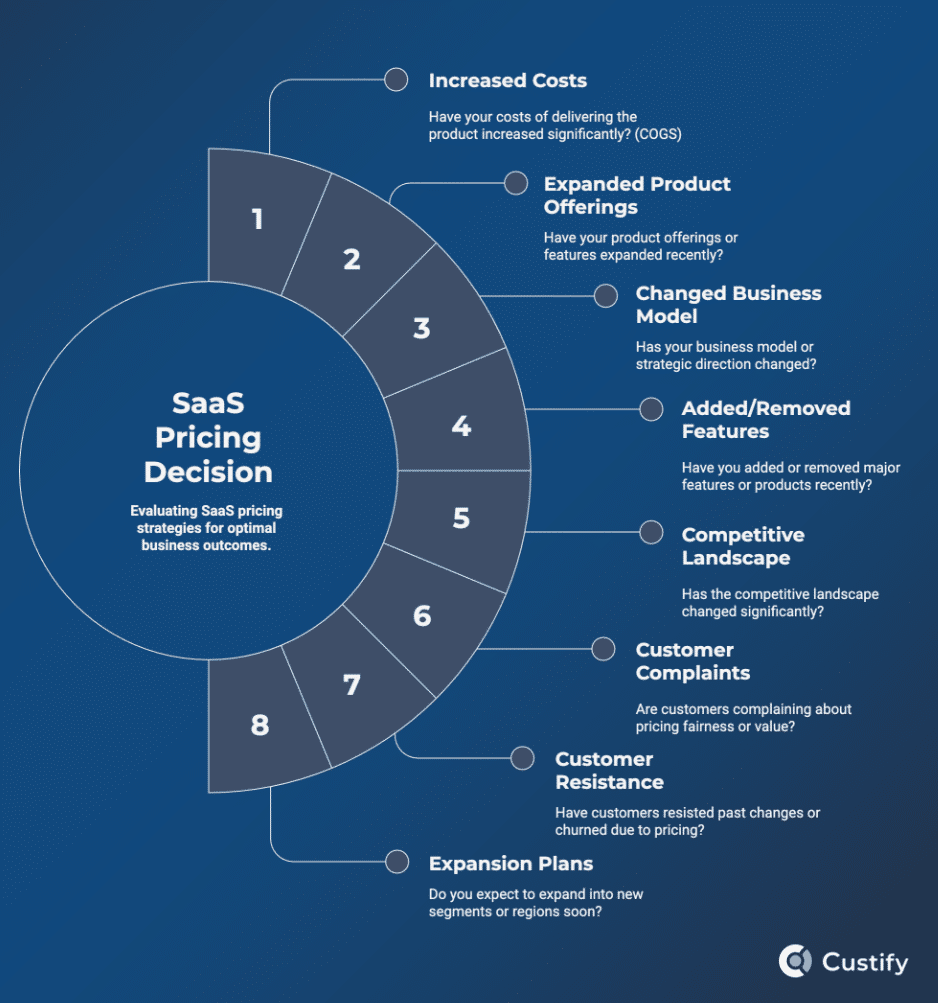
Companies resort to a pricing change for some key reasons:

  1. Changing priorities. If the company redesigns its business model, chances are its prices also need to shift slightly to accommodate the new direction.
  2. Changing products. When products evolve, so does the cost of production. If you’re adding products or removing them, your cash flow might look entirely different, and a new pricing model can help balance that out.
  3. Changing costs of goods sold. There can be plenty of reasons why the cost of delivering your product or service increases (or, rarely, decreases). These changes often result in a need for a higher price point.
  4. Changing business landscape. In a competitive landscape, businesses either evolve to meet and exceed their competition or get left behind. Case in point, Intel’s CEO recently announced massive layoffs due to their lack of agility in competing in AI. The impact of such shifts can be mitigated by changing your pricing strategy.
  5. Need to expand. Speaking of shifting landscapes, in some areas of business, it’s imperative to expand your portfolio or get crushed by the complexities of running a profitable company. When faced with a need to expand, it’s worth reexamining your pricing model to see if it’s still relevant.

According to a 2024 report on the State of SaaSOps, we’re currently in an era of austerity, where “every dollar spent on SaaS needs to demonstrate clear value.” The updated report from a year later shows the trends continuing – with 13% of SaaS spending cuts being due to other SaaS apps’ price increases.

Amidst such scrutiny, the pricing model you pick couldn’t be more important – you’ve got to understand customers and help them reach their goals at an affordable price point.

3. Observing Customer Wants and Needs

Adopting a customer mindset can give you the necessary support to make informed decisions. But it’s not enough. You should also learn about the psychology of pricing:

Tactics such as charm pricing are ubiquitous – we’ve all seen price tags with “.99” at the end. Other psychological tactics include price anchoring, decoy, odd-even, and center stage pricing. All of these are fundamentally rooted in how consumers think about a purchasing decision.

To help you make smarter price change decisions, let’s distill the logic behind these tactics and add some common insights about customer behavior:

  1. Customers want to feel like they’re getting a good deal.
  2. Customers are inherently biased towards the left digits of your price point.
  3. Customers in some industries prefer making a premium purchase.
  4. Customers often gravitate towards the middle pricing tier.
  5. Customers want adequate communication of new pricing
  6. Customers appreciate you being real instead of over-apologizing.
  7. Customers want stability in their bills.
  8. Customers don’t want to feel scammed.
  9. Customers don’t want to pay more than they have to.
  10. Customers don’t want features they don’t use.
  11. Customers want to see the value.
  12. Customers want products that evolve and improve.
  13. Customers will resist change, no matter how small.
  14. Customers either want or would appreciate loyalty rewards.

saas pricing decision map

The Execution: Follow a Customer Success Strategy to Prevent Churn and Drive Upsells

When implementing a price change, it’s vital to be strategic and align with CS, sales, support, account management, and any other customer-facing team before the change goes live.

If possible, gauge customer sentiment regarding specific changes, use AI retention tactics to be more data-driven, strategic, and not miss any obvious red flags. Let’s break down everything you should do before going forward with such a big change.

1. Align with All Customer-Facing Teams

We’ve seen many times how strategic, leadership-level decisions are taken without clear CS input or at least informing CS. This forces CSMs to defend price changes when they have never even heard the logic behind those changes, let alone had the chance to agree with those changes.

To avoid miscommunication leading to unnecessary customer friction, increased CSM workloads, and customer churn:

  • Discuss any potential price change ahead of time with the heads of all customer-facing departments. If better solutions emerge, don’t be afraid to pivot.
  • Explain the need for the price change to your team: what’s the cost of not raising the price – sometimes, that’s all it boils down to.
  • Brainstorm a strategy – every step you decide to take should be written down along with a strategy for communicating that point to customers.
  • Settle on a few ideas, don’t try to do everything. It can be tempting to rethink your entire strategy, change your product, add a higher tier, and devise a communication strategy to keep legacy accounts paying their original price point. But ask yourself – is that doable? Consider the scope of your changes and pace yourself.

2. Create a Strategy for Making the Pricing Change

Next, we come to the actual strategy. I’ve found that most strategic decisions, such as a price change, need a few clear things settled before you proceed:

  • What is your objective? Write it down clearly.
  • What happens to existing customers? If you’re not considering existing accounts, they might feel left out and churn.
  • How do CSMs communicate the change? CS should have clear scripts for all customer categories, along with emails, Slack messages, in-app notifications, and everything else necessary to ensure the transition is as smooth as possible.
  • How should support handle complaints? What are the most likely complaints you’re about to receive? How are you going to handle them? Your customer support team should be equipped with tools, scripts, and special offers in case customers are about to churn.
  • How can sales pitch new plans? If you’re adding new subscription tiers, those will need to be sold, so try to answer:
    • What’s the pitch for new customers?
    • What’s the pitch for upsells?
    • What’s the pitch to prevent downsells?
  • What’s the play-by-play? Lastly, but maybe most importantly, you’ll need a full playbook for implementation that tells you what to do in each stage, who the owner is for every part of the process, and what to do in case things don’t go according to plan.

3. Address the 4 Common Issues with Price Changes

Throughout our research, we’ve uncovered 4 negative qualities of pricing changes that you need to consider. For each one, think about turning it into a corresponding positive quality.

  • Unsustainable ➜ Sustainable. Unsustainable changes don’t bring in enough revenue to keep the business running long-term. While shorter gains might be observed, the larger picture will always look more dire. Your goal here should be to think of long-term metrics like customer lifetime value, CAC payback period, and your retention, churn, and expansion rates.
  • Unjustifiable ➜ Unquestionable. If you’re struggling to find arguments for your price change, take a step back, go through the decision flow again, and look for any cracks in your logic. Price change decisions should be unquestionable and leave no room for doubt among your team.
  • Unsellable ➜ Selling points. Remember that every new price tier should be something potential customers are willing to pay for. If you’re adding a pricing tier that nobody wants, you’re not saving costs; you’re doing the opposite.
  • Uninspired ➜ Strategic. Lacking inspiration is something common when making business decisions – however, the solution is simple. Simply sitting down with your team, board, and/or advisors can help you think strategically and come up with obvious solutions that would’ve otherwise remained hidden.

Even something so simple as a small chat with the lead CSM for an account can uncover truths you were previously blind to. It’s all in the eye of the beholder, if you.

4. Put Together a Risk Assessment Matrix

Next up, I recommend putting together a risk assessment matrix as you would for any project. Think things like:

  1. Old customers complain that they pay more than new ones
  2. New customers find out they pay more than legacy ones
  3. Customers realize they only need one premium feature, but have to pay for five
  4. Customers demand downgrades but are contractually locked into their plan

What will you do for each scenario? Do you have some emergency exits for your plan? Risk matrices are an extremely helpful business management tool because they help you plan ahead for the worst-case scenarios.

5. Use AI to Gauge Customer Sentiment

For each customer or customer segment about to be affected by your price change, you should ensure you have an accurate assessment of their sentiment score and global health score.

Each account goes through many different stages during its lifetime, and your announcement might come at a bad time.

Picture this: you’re about to click send on a price increase notification to a customer who’s already dissatisfied, not using your product, and about to churn. Or worse yet, that notification could go out automatically, leaving you no time to react.

To bypass these risks, use AI to gauge customer sentiment, make sure your customer health scores are capturing the most important insights, and always act on those insights you glean.

6. Find the Right Mix of Value, Timing, Impact, and Investment

A price change shouldn’t come alone. If all you’re doing is changing the price, it might feel like just a money grab. You have to make sure there’s a good balance between value offered, the timing of the change, the potential impact, and the money you’re spending to make the change go live.

That’s precisely why these four elements should be thought of separately. You can use your CSP together with AI to figure out:

  1. The perfect value addition – what can you add to justify the price change?
  2. The perfect time to change the price – when is the best time to implement it?
  3. The expected impact of the change – who will it affect and how much?
  4. The amount of money you can spend on it – can you budget everything necessary to make the change?

7. Soft Launch and A/B Test, If Possible

A great way to implement a price change is to do it slowly and work based on a timeline that you lay out on a calendar for the entire team to see. Some ideas:

  1. Start with the group of customers who are likely to be the least affected by it.
  2. Roll out the change in stages, moving from segment to segment until everyone learns of the new pricing.
  3. Create separate engagement strategies for each segment of customers affected by the pricing adjustments.
  4. Do an A/B test – select a few customers and use different pricing changes or different strategies to communicate the same change.
  5. Track your soft launch metrics and be prepared to adjust before the big price change goes live.
  6. Address downgrades before customers have time to think about them – with the right proactive strategy, you can prevent them entirely.

The Implementation: Track Everything Under the Sun and Make Adjustments

Preparing and launching a price change might seem like a large enough task, but you shouldn’t rest on your laurels, so to speak. The period immediately following a price change is critical to maintaining customer loyalty and cementing the price adjustment as the correct decision for your business.

Things to track at this stage:

  • MRR, ARR, NRR
  • CSAT, NPS
  • CAC, Customer Lifetime Value, CAC Payback Period
  • Customer support requests
  • Renewals
  • Upsells
  • Churn
  • Average Handle Time
  • Every customer health score you have
  • Customer Downgrades

How to Track and Pivot after a Pricing Adjustment

Measuring the impact of your price increase can be done in several ways:

  • Health scores. Setting up customer health scores for the most important metrics from the list above can help you monitor them and gain insights in real time. Simply pick the ones that make the most sense for your use case, determine your benchmarks and weighting, and begin tracking.
  • Signals. Signals are ways to automate customer health scores based on certain triggers. For example, you could have a signal that notifies you if a customer approaching renewal saw a 20% drop in feature usage.
  • Automation flows. Apart from signals, you can set up more complex automation flows that execute specific sets of instructions based on more advanced or interconnected triggers. For example, if you see a usage drop, a decrease in customer communications, and declining success metrics, you could create a flow to notify the team, automatically send an email to the customer, and move them to a separate customer success playbook.
  • AI. Using an LLM or specific AI features in your CSP, you can interpret customer data captured pre- and post-pricing change. This can give you highly-specific and actionable insights into customer behavior and whether you need to further adjust your pricing, roll back the changes, or keep things steady.
  • Custify. Our platform can help you implement all three of these tracking methods so you can stay on top of your customers’ health and get insights into your recent pricing adjustments in real time, while ensuring stakeholders (such as your higher-ups) have full visibility.
Customer overview in CustifyCustomer overview in Custify
Customer overview in Custify.

Once you’re equipped with all these monitoring tools, your insights should tell you whether you need to make any microadjustments, emergency exits, or extra discounts for loyal customers.

FAQs about Pricing Changes, Downgrades, and Upsells

1. How should I support customer downgrades?

Simple: remember downgrades are preferable to full churn and should be treated as such. Prepare materials for downgrates (how-tos, guides, etc) and assist customers through the transition.

2. How can I raise prices without losing customers?

Test your pricing changes against a small group of customers – or implement A/B testing. Make sure you actually need to raise prices (rethink your decision tree). Lastly, only increase prices if you’re also increasing the perceived value of your offering.

3. How can I lower prices/tiers without losing revenue?

Think about how you can offer loyalty rewards to customers currently on a higher plan to prevent downgrades. Consolidate your prices to offset any losses with gains in other areas. Upsell lower-tier customers through a well-thought-out upsell strategy to recoup some of your losses on higher plans. Lastly, think about other ways that can help you generate revenue that are more sustainable.

4. How to introduce higher tiers and encourage upsells?

Align with your entire team on a strategy – make sure you’re actually increasing the value provided to higher-tier customers. Then, draft outreach strategies with your Sales and Customer Success teams – see what customers want, how you can demonstrate the added value to them, and when the best moment to reach out is. Use your customer success platform to monitor accounts and identify upsell opportunities, then reach out using your existing strategy. Don’t forget to do the appropriate research about the customers you end up reaching out to.

Summing Up

Making a price change will always be a gamble, no matter how much information you have or how prepared you are. Unseen consequences often come to light after you’ve made the change. That’s why you need a reliable ally for your efforts.

Feel like trying out Custify and seeing what it can do to help you reach your goals? Sign up for a free demo with our team and feel free to pick their brains about your upcoming price change – they have experience working with all kinds of SaaS and can most likely help you (no purchase necessary). Good luck!


News
Berita
News Flash
Blog
Technology
Sports
Sport
Football
Tips
Finance
Berita Terkini
Berita Terbaru
Berita Kekinian
News
Berita Terkini
Olahraga
Pasang Internet Myrepublic
Jasa Import China
Jasa Import Door to Door

6 Things a CRM Can’t Do in Customer Success


The relationship between account management, sales, and success has become significantly more well-defined in recent years.

Consequently, so have the two main tools used for customer engagement, the customer relationship management (CRM) and customer success platforms (CSP).

All three roles deal with customer service in one way or another, yet their specific tasks couldn’t be more distinct.

That’s why a CRM will never be enough for customer success. In today’s article, I’m going to explore why, based on my experience as Head of CS and our customers’ testimonies as to their difficulties using CRMs for CS.

What’s the Main Difference between a CSP and a CRM?

To figure out the main difference, let’s first talk about each platform:

A CRM, or customer relationship management platform, is a software product that helps one organize and manage their contacts, sales opportunities, and customers. These solutions are typically employed by sales teams or organizations, providing a well-structured hub for their interactions, communications, and outreach initiatives.

Recent stats about CRMs show:

  • 4 in 10 companies reported 11–20% higher revenues after CRM rollout, and 89% saw a revenue bump (Freshworks / Forrester Survey).
  • Most CRM adopters enjoy roughly a 21–30% increase in sales revenue post-implementation (Nucleus Research).

A CSP, or customer success platform, is a software product that helps companies monitor their customers’ journey, usage, and health, allowing for lower churn rates, increased retention and loyalty, and more data-led and purposeful upsell and expansion workflows. CSPs are typically the primary tool used by customer success managers to monitor, engage, and assist their assigned customers.

Recent stats about CSPs show:

  • SaaS firms with a formal CS team (and platform) enjoyed ~5 percentage points higher renewal rates than peers without one (Forrester).
  • ROI calculators project large paybacks: e.g., 150–400% ROI over the first 6–12 months (The CS Cafe)

CRM vs CSP – Side by Side Comparison

crm vs csp

Can a CRM Do What a CSP Does?

To answer the question directly – no, not really. You can attempt to do some of the things usually left to the CSP, but the result will always be suboptimal simply because CRM platforms are not designed for the same thing as CSPs.

In fact, many senior CSMs who come to us requesting help already have such an implementation – a mishmash of CRM workflows, emails, Google Drive folders, and random spreadsheets. This mix drags their entire workday and leaves them overworked, stressed, and underperforming.

When you’re in that position, just about anything would be better. For most CSMs, though, a fully-functioning, purpose-built CSP is the dream. Being able to automate, reduce busywork, and keep an eye on customers proactively without having to dig through ancient emails can be a lifesaver, as Stijn Smet, Head of Customer Success at Whale can attest:

So at the end of the day, a CRM will only ever be something to assist a CSM, and could never work as a replacement for a CSP. 

Following is an illustration of the decision framework for choosing between a CRM and a CSP, to help clear things up. Below it, I’ll highlight some key things CSPs can do that CRMs either struggle with or are simply not designed to do.

decision framework crm vs cspdecision framework crm vs csp

Top Things You Cannot Do in Customer Success with a CRM

1. In-Depth Tracking of Customer Behavior Inside the Product

A proper CSP integrates directly with your software product to obtain real-time usage data based on your users’ behavior. That data is then neatly arranged in your customer 360 view or whatever dashboard you prefer. The result is a fully customizable “mission control” where CSMs can track customer behavior, allowing for things like:

  1. Tracking onboarding progress
  2. Monitoring product and feature adoption
  3. Identifying friction points in the customer journey
  4. Determining moments when the customer is at risk of churn
  5. Finding upsell opportunities

These are just some of the ways customer behavior tracking works inside a CSP. The insights you glean from a CSP simply cannot be obtained through a CRM. The two are distinct tools, and while they may aid the lead CSM, the ways in which they do so are vastly different.

Example:

customer product usage tracking example cspcustomer product usage tracking example csp

In the example above, we can see a dashboard for an example company – Microsoft – tracking their users’ behavior inside the product. Just at a first glance, we can see their product usage over time, CSAT score, onboarding and adoption progress, as well as an overview of their health scores.

2. Create and Monitor Customer Health Scores

Speaking of health scores, that’s another important feature that CSPs have over CRMs. Specifically, most CSPs allow for the creation of custom metrics specific to each customer or group of customers that will tell you specifically how that customer is doing.

These health scores naturally have impact and weighting settings, and are color-coded, typically showing up on your customer success dashboard (such as in the example above), allowing you to quickly spot any that go in the red.

Example:

health scores example CSPhealth scores example CSP

In this screenshot, the example client isn’t doing so well. Their health scores are in the yellow, and they’re showing clear signs of a slow onboarding. However, the assigned CSM rated them a 4/5, which means they may be on the right track, and the health scores are lower for a good reason (delayed implementation, preplanned time off, etc). Customer health scores paint a good picture of where the client is, and with the additional context provided by the CSM, we can then decide what the next steps should be.

3. Automate Customer Engagement Based on Key Success Metrics

One of these next steps could involve creating an automation flow to send a few emails to customers who look unengaged or like they’re about to churn, like in the example in the screenshot above.

Low engagement, especially in the initial stages of a customer’s journey, means they haven’t reached the value realization stage, and therefore have one foot out the door. It’s a critical moment for any SaaS customer – and it’s the point where you should be reaching out.

Here’s where a CRM just won’t cut it:

You’ll need to automatically determine the moments when customers walk down the path to churn and immediately trigger an automatic flow that sends them emails, knowledgebase pages, training videos, or a simple check-in message on Slack. A good CSP can handle all of those steps with ease – what’s more, a great one will use AI to help you build the automation.

Example:

AI playbook example automation cspAI playbook example automation csp

In the example above, we’re asking the AI built into the Custify CSP to generate a playbook (automation flow) for inactive customers. The goal is to engage them with a series of emails and assign internal tasks to follow up.

4. Design Lifecycles and Track Customers Moving through Them

Since CRMs are not designed to monitor customer lifecycles and their activity within the app, they typically don’t have advanced features to help you do that. CSPs, on the other hand, often have built-in lifecycle features to track specific parts of the customer journey.

With a CSP, you can create and monitor lifecycles for:

  1. Customer onboarding
  2. Product adoption
  3. Feature adoption
  4. Customer retention
  5. Customer expansion
  6. Any other sub-stage of the customer journey you want tracked

Example:

lifecycles example onboardinglifecycles example onboarding

Here you can see all enterprise customers who’ve entered the onboarding stage. The lead CSM in this case would be able to see that 6 are behind in their onboarding, while 4 are stuck, requiring them to step in.

5. Proactively Manage and Increase Expansion

Contrary to popular belief, CSPs aren’t just designed for churn reduction. It’s more accurate to say they’re tools for delivering value at scale to customers. That value delivery, of course, comes with a few caveats. For one, delivering true customer outcomes leads to increased retention and loyalty, and then any value you’re able to add on top of that can lead to significant gains in expansion revenue.

While CRMs can be great at helping these expansion efforts, the addition of a CSP allows you to:

  1. Proactively identify customers that are ideal upsell or cross-sell candidates
  2. Determine what types of features or add-ons can be upsold to each customer
  3. Find the perfect moment to present them with an offer
  4. Draft the right messaging by looking at specific account signals
  5. Prevent downgrades and encourage upsells during a price change

Example:

Playbook example customer engagementPlaybook example customer engagement

The automation flow in this example automatically checks if a self-service customer’s plan has been upgraded from Trial to Basic. If they haven’t reached the Basic level of usage, the automation adds a note to the user for the CSM to check in and attempt to get them over the finish line and grow their MRR.

6. Personalize Dashboards, Reports, and Customer Portals for QBRs / EBRs

Last but often one of the most important ways a CSP can help where a CRM cannot is with QBRs, EBRs, or other customer check-ins. CSPs such as Custify give you the option to create custom dashboards, reports, and shareable customer portals that you can utilize in your customer meetings to look as professional as possible.

Customer portals are fully brandable and customizable pages that you can use to pinpoint customer tasks, progress, KPIs, and lifecycle stages. Oftentimes, customers stop being engaged with your tool before they get to see the true value it can bring. A customer portal is the perfect tool to reengage that client and attempt to get them on the right track.

Example:

customer portal example cspcustomer portal example csp

An example portal showing the onboarding process for a new client, including all the steps they need to go through before full implementation of their CSP.

FAQs about CRMs for Customer Success

1. Which to get first as a new SaaS company, a CRM or a CSP?

Most CSPs wouldn’t admit this, but we recommend starting with a CRM. Why? Because you’ll need a place to organize your contacts, sales opportunities, outreach initiatives, and initial customers before you need a place to monitor and engage with them. It’s as simple as that.

Sure, if you can afford both, it’s better to get a CSP and a CRM at the start. Otherwise, go for a CRM, but be strategic about your customer success initiatives – just because you’re not investing in a CSP early on in your SaaS doesn’t mean you shouldn’t have a CS strategy and a lead CSM.

2. When should a B2B SaaS choose a dedicated CSP over extending its CRM?

The clear sign you need something more than a CRM is when you’re getting lost in emails, spreadsheets, CRM contacts, and all the other tools you use. If you’re constantly wishing for a better way to handle customer relations, then a CSP is the right choice.

3. What CSP works best with HubSpot and why?

Most CSPs work great with HubSpot. That said, Custify fully supports integration with the Hubspot CRM, allowing you to import contacts, companies, notes, meetings, tickets, and more.

Furthermore, Custify exists both as a separate platform and as an app inside the HubSpot ecosystem. This lets you use the two together in Enhance mode, which syncs data between your backend and both platforms, allowing you to work with a primary source of truth.

Last, but maybe most importantly, Custify customers have a dedicated CSM that can help them with their setup, ensuring that both the CRM and the CSP work together seamlessly.

hubspot integration custifyhubspot integration custify

4. Do I need a CSP if I already use Salesforce/HubSpot?

Yes. Salesforce and HubSpot are both CRM platforms at heart. While both companies have expanded the list of features they offer, their platforms cannot replace having a dedicated CSP. Fortunately, Custify integrates with both seamlessly.

5. What are some best practices for migrating customer data to a new CS platform?

There are several ways in which that can be done, but in the end, it all depends on the way that you are storing your data. Custify covers several options to ensure a smooth transition of data into the platform, such as:

  • native integration with your CRM
  • data warehouses/datalakes
  • API connections
  • CSV imports
  • connections with other transfer facilitating tools, such as Zapier or Make

The most important thing to consider is ensuring the presence of unique identifiers in all the systems that need to be integrated with your CSP in order to ensure a smooth data transition.

An additional, but very important part would be to make sure the data is accurate in all the systems. Before migrating customer data, ensure there are:

  • no duplicates
  • no different names for companies
  • no different unique IDs

Andreea Cheregi, Senior Customer Success Manager, Custify

6. How do I migrate my customer success workflows from Salesforce CRM into Custify?

We have a native integration with Salesforce that will ensure a seamless transition of your data into our systems. Regarding the workflows, these can be shared with your assigned CSM from Custify, and they will make sure to help you implement the same into your Custify account.

Andreea Cheregi, Senior Customer Success Manager, Custify

CRM? CSP? Both?

In the end, there’s no two ways about it – you will need both a CRM and a CSP. While they serve different functions, those  functions are often connected:

  • A CRM can help CSMs pass over churn data and help Sales qualify existing leads.
  • A CSP can help Sales organize handoffs so all the important data about a new customer makes it over to the CSM.

For a full concierge onboarding of your CSP, complete with full CRM integration and workflow migration, sign up for a 15-minute call with our team. Our CSMs are eager to learn more about their next exciting project!


News
Berita
News Flash
Blog
Technology
Sports
Sport
Football
Tips
Finance
Berita Terkini
Berita Terbaru
Berita Kekinian
News
Berita Terkini
Olahraga
Pasang Internet Myrepublic
Jasa Import China
Jasa Import Door to Door

How to Choose in 2025


In software, we’re in the business of delivering digital solutions to a diverse set of customers. Customer success software can help deliver those outcomes more effectively.

Why?

Picture this: you spend months or even years developing a product. And then a month into their lifecycle, your customers start to churn.

You wonder – how did that happen? Well, without a customer success platform, your options to get to the truth are severely limited. But how do you pick from the incredible range of customer success tools and software available? That’s what I’m here to help you with today.

Things To Consider about Customer Success Software

Customer success software started as a tool to address customer churn. It then evolved into much more than that. Today, CSPs such as our own help software companies deliver value to customers more reliably – through monitoring tools, automation, lifecycle management, customer portals, and increasingly smarter and more advanced features.

Decision Criteria: Do I Need a CSP?

Customer success software enables better onboarding, leading to up to 53.5% less churn during the initial stages of a customer’s journey. That, in turn, also contributes to better renewal rates and expansion opportunities. So it’s fair to say that CSPs are not just helpful, but essential to both happy customers and a steady, healthy growth rate.

That said, a CSP might be difficult to budget for startups or small companies. To help you out, I put together a small decision matrix of when a CRM is enough vs when a CSP becomes essential.

decision framework crm vs csp

It’s not a CRM

\While it’s often purchased after a CRM and can work in conjunction with one, it’s a standalone piece of software that’s intended for the customer success team. While other teams in your organization can find the data in a customer success platform useful, its primary use will always be to deliver accurate, real-time insights to CSMs and help them act on those insights.

Explore: 6 Things You Cannot Do in Customer Success with a CRM

It’s not optional

Within the lifecycle of every SaaS, there will come a moment when they’ll have to ask: is this the right time to invest in a CSP? When that moment comes is different for each company, and it will depend on a few factors (some of which I’ll explore here). However, strategic and future-forward business leaders should put this milestone on their roadmap. It typically coincides with the point when keeping track of customers is becoming more cumbersome than expected.

It can’t be built in-house

Plenty of teams want to go for a build vs buy approach, but it simply doesn’t work when it comes to customer success software unless you’re a giant corporation with big budgets to spend. More often than not, a “build” effort won’t go well – unless you have a dedicated team to maintain event pipelines, health models, automation, and QBR portals, in-house attempts devolve into spreadsheets and scripts that won’t scale. Eventually, you’ll need to gather all the information and import it into a dedicated customer success solution.

It needs to match your needs

The most helpful customer success tool you can get is one that precisely matches the features you need. While most CSPs can handle a range of common customer success tasks, it’s going to come down to the specifics of your use case and whether your chosen CSP can handle it or not. For this, I recommend making a shortlist of candidate CSPs and signing up for a demo (and potentially a customer POC) with each one.

It needs to be flexible

A good customer success management platform will adapt to your needs, no matter your SaaS growth stage. It should be able to scale along with you, and your assigned CSM should help you along the way. The playbooks and lifecycles you build inside the platform should be able to be applied to every new customer or customer segment seamlessly.

It needs to be used

Lastly, the platform you pick should be adopted by your entire CS team, and all other relevant stakeholders should have visibility of the metrics and dashboards relevant to their role.

If you’re not budgeting time for onboarding and implementation, you’re likely not ready for a customer success tool. Upon selecting your CSP, your assigned CSM should be there to walk you through implementation and keep you on track for full adoption and value realization. You’ll need to plan training, playbook templates, and set a QBR calendar together with them. Remember: adoption is a project, not a switch.

How to Choose the Right Customer Success Platform

choosing the right customer success softwarechoosing the right customer success software

1. Figure out why you need one

Before you pick a customer success platform, you should be very clear on why you need one. As the SaaS space becomes more and more diverse, features you would consider essential may be absent from some tools. Do the appropriate research and write down the reasons why you’re looking to adopt a CSP.

Consider some of the most common reasons:

  1. Accurately tracking customer behavior in real-time, with the possibility of acting on those data points with speed and accuracy.
  2. Creating and monitoring customer health scores per account, segment, and for your entire customer base.
  3. Understanding churn precursors, implementing proactive and AI-powered retention strategies, and increasing customer loyalty.
  4. Driving expansion through more targeted upsell and cross-sell propositions, and implementing automatic flagging of opportunities.

2. Settle on a budget for the tool

Next, you should figure out how much you’re willing to spend on a CS tool. While many have multiple plans, others allow you to customize your subscription based on your needs, availability, and budget.

Knowing how much you can spend on your customer success platform subscription will help expedite the process. Furthermore, if there are any add-on features you would like, having a preset budget will immediately tell you if you can afford them.

3. Consider your engagement model

A key consideration when choosing customer success software is the level of engagement your customers need. Say you operate a self-service business – your clients might need more automated support, while complex outreach features can take a back seat.

On the other hand, if your customers are bringing in >100K ARR, then you’ll likely need instruments to take better care of those clients.

Let’s look at the features you could probably use for each of the main engagement models:

  • High touch. When customers bring in high ARR and need more guidance, you’ll likely opt for a low CSM ratio. To that end, you will need a CSP that can monitor the minutiae of your clients’ product usage, alerting you to even the smallest changes and milestones. You’ll also need complex, customizable customer dashboards that go beyond the basics and allow you to set up precisely what you need to monitor for each account. Lastly, you’ll need advanced customer portals to help during your EBRs / QBRs.
  • Tech-touch / mid-touch. When customers bring in less ARR but still require occasional check-ins, it means you’re in a tech-touch or mid-touch engagement scenario. In these cases, you’ll need a CSP with good automation capabilities, lifecycle management, and the ability to track customer activity and proactively identify issues.
  • Low touch. In a low-touch environment, the average CSM will have hundreds or even thousands of accounts to monitor. In this case, you’ll need a CSP that can give you an overarching view of customer activity and the ability to see problem accounts at a glance. Automation also continues to play a key role at this stage.

4. Determine what’s mandatory

If you’ve followed the previous points, you should now have:

  1. A clear goal for your customer success software
  2. A set budget dictating how much you can spend on the tool
  3. A well-defined engagement model for when and how much to reach out

All these together should give you a clear picture of the mandatory features you would like in your ideal customer success platform. These are features that you should be able to afford realistically and will require to ensure your customer success team moves with speed and efficiency.

Before moving on to reviewing your CSP options, however, you should also make a list of optional and nice-to-have features that you could add to your CSP in case you can afford it.

Note: This is also the point where you should determine which integrations are essential to ensure your customer success workflows work with maximum efficiency. From CRMs to data warehouses, BI tools, and many others, SaaS tech stacks are ever-growing and ever-changing, so it’s important to make sure you can send data between your tools.

5. Review your options and discuss

Next, it’s time to review your options. By this point, you should have your list of requirements, nice-to-have features, and a clear budget. Now it’s time to review these internally, make any necessary changes, and come up with a full set of questions to ask CSP representatives once you go into demos with them.

  • Then turn to the tools available on the customer success platforms market and:
  • Use AI to break down your options and do a side-by-side comparison.
  • Make a shortlist of the ones that most match your requirements.
  • Set up demos with all of the main contenders.
  • Compare not just the tools themselves, but how the respective companies handle the demo call and any subsequent interactions.
  • If possible, opt for a customer POC with each one of the CSPs you pick.

Lastly, discuss your findings with everyone on your team and all decision makers involved in the process, and settle on an optional customer success solution.

❗️Reminder: You just went through a long, arduous process, and it’s normal to expect the chosen customer success software to work perfectly from the start. That may well happen, but only if you factor in appropriate time for onboarding, implementation, and learning the tool. Lastly, remember to calibrate your expectations – you should be convinced the tool and people you’re choosing to patronize can lead you towards your goals.

Your Customer Success Software Options


1 Ideal fit Startup → Mid‑market (scales to enterprise) Enterprise / complex orgs (also “Essentials” for growing teams) Mid‑market → Enterprise
2 Data model Product events + CRM/support data Product usage via Gainsight PX (Product Mapper) + CRM, support, and warehouse/analytics connectors Unifies CRM, support, product analytics & warehouse telemetry (e.g., Pendo/Amplitude/Mixpanel/Segment; BigQuery/Snowflake)
3 Health score engine Weighted measures & segment‑level inputs; AI summaries Scorecards with weighted measures across dimensions Flexible health profiles; weighted factors; Success Units (usage‑based or manual)
4 Automation Event‑based playbooks; AI‑generated playbooks; Journey Orchestrator (triggers: health, usage, surveys, lifecycle) Automations / Workflows (event/schedule/webhook triggers; Projects & Sequences)
5 Lifecycle management Custom and built‑in lifecycles (onboarding, adoption, renewal) Success Plans, Objectives, and journey programs Journey boards / workflow tracking for onboarding & adoption
6 QBR / Portals ✅ Branded, shareable customer portals & dashboards ✅ Share360 (external read‑only C360 snapshot for customers/partners) ✅ Branded Customer Portals (share plans, tasks, metrics)
7 Integrations 25+ 36+ 60+
8 Pricing model Quote (tiered/account‑based) Quote (Essentials & Enterprise) Quote (tiers; often unlimited seats)
9 Notable mentions Concierge onboarding; fast time‑to‑value PX adds in‑app analytics & event mapping; broad connector ecosystem Strong portals & collaboration; flexible automations; deep native integrations

1. Custify

custify screenshot all featurescustify screenshot all features

Custify is a customer success software specifically designed so SaaS leaders can manage customer health, prevent churn at scale, and improve customer relationships. The core features of Custify cover most use cases in SaaS, from low-touch to high-touch models and anywhere in between. Custify seamlessly integrates with both your CRM and data warehouse to ensure maximum visibility of all relevant accounts and their metrics.

Ideal for: startups / mid-market SaaS companies

Key Features:

  • Customer health scores
  • Lifecycle management
  • Automation
  • Concierge Onboarding (white-glove)
  • Automated workflows
  • Customer dashboards
  • Customer portals

Pricing: Contact sales for more details

2. Gainsight

gainsightgainsight

Gainsight is a high-end customer success platform specifically tailored to enterprise customers that require advanced setups. Their platform allows you to track customer health and create centralized dashboards for your assigned clients. However, Gainsight does have a few limitations – specifically, it may be overkill for smaller or even mid-sized companies.

Ideal for: enterprises

Best features:

  • Customer health monitoring
  • Customer support
  • AI-Powered customer engagement
  • Customer 360-degree view

​​Pricing: Available upon request.

3. Planhat

planhatplanhat

Planhat is a CSP focused on data collection and analysis, allowing CSMs to monitor product usage, automate workflows, set goals, and collaborate with their teammates. Planhat is cited as being slightly difficult to learn and use, but the team provides excellent support that can help move customers past any issues.

Ideal for: mid-market and enterprise companies

Best features:

  • Customer portals
  • AI automation
  • Customer support
  • Task management

Pricing: Available upon request.

For more options, see our article on free and paid customer success tools.

FAQs about Choosing Customer Success Software

1. What’s the best customer success platform for startups under $10K budget?

For startups, the best tool is one that balances affordability with automation capabilities and AI. Many platforms can be too enterprise-focused or expensive for small companies.

Multiple independent reviewers and platforms have cited Custify as a great choice for startups. Our custom pricing is affordable while our platform still comes with all the capabilities you expect from a high-level CSP, making it a strong fit for early-stage companies under $10K budget.

Technology startups often adopt Custify to streamline customer success workflows during their growth phase. The platform’s automation and data-driven insights help small teams manage customer relationships effectively while scaling operations.

– Research.com Custify Review

2. What’s the fastest customer success platform to implement?

Implementation velocity depends on how easily a platform connects to your existing tech stack. Most platforms require a lot of customization, which adds weeks or months to the setup, particularly if you’re left to figure it out on your own or with minimal support.

Custify, on the other hand, integrates quickly with CRMs, analytics, and support tools, making it one of the fastest to get up and running. With our premium concierge onboarding, every Custify client is onboarded in approximately 4 weeks (depending on their requirements for implementation, integrations, and their team’s availability).

3. Which customer success platform works best for B2B tech companies?

As we mostly cater to B2B tech companies, we know the common challenges facing them: multi-touch onboarding flows, complex accounts, revenue retention pressures, and expansion KPIs. The best customer success platform in that case is one that has all the features you would expect (health scores, playbooks, automation, lifecycles, AI, portals), but with the option to customize them to your needs and an assigned CSM that can guide you through the implementation.

Custify covers all of those bases, and our team has extensive experience helping other B2B SaaS CSMs lead the charge in their customer success efforts.

4. How to choose customer success software for a remote team?

A good customer success software for remote teams will include the following features:

  • Tasks and alert management systems
  • Automation capabilities
  • The ability to have multiple users (CSMs)
  • The ability to share customer reports, portals, and more
  • Integration with remote work tools such as Slack, Microsoft Teams, and others

Fortunately, most CSPs today, including Custify, can handle all of the above and more.

5. ChurnZero vs Totango vs Custify – which platform is best for a mid-market SaaS?

The ideal solution for mid-market SaaS needs to be powerful enough to support automation, customer health tracking, and expansion strategies, but lean enough to implement quickly and use daily. It should also be able to scale along with your business, allowing you to keep growing unimpeded.

Custify fits well into this sweet spot, and many of our clients are already in the mid-market category.

Summing Up

While the options you have are plentiful, few of the ones out there can fully meet your needs. As the SaaS world continues to grow, diversify, and expand, our needs also become more complex.

That’s why I wrote this piece – to help guide your decision-making and hopefully make you carefully consider your needs, budget, and feature requirements.

If you need further help deciding, you can set up a quick call with our team. Together, we can help break through the noise and choose a solution that doesn’t require you to compromise in any way.


News
Berita
News Flash
Blog
Technology
Sports
Sport
Football
Tips
Finance
Berita Terkini
Berita Terbaru
Berita Kekinian
News
Berita Terkini
Olahraga
Pasang Internet Myrepublic
Jasa Import China
Jasa Import Door to Door

The cost of free: Rethinking what we charge for in CS | Webinar


In this webinar, Irina Cismas, CMO of Custify sat down with Clare Knight from the Onboarding Lab and Jamie Moquin, Partner Success at Stellic, to discuss a critical question: when should Customer Success remain free, and when should services come with a price tag?

Summary Points

In this session, we explored how CS teams can balance free vs. paid services, set boundaries with Sales, and package value in a way that earns buy-in from both customers and leadership.

Key takeaways include:

  • Define what belongs in CS vs. Professional Services to avoid scope creep.
  • Charge for onboarding when it accelerates time-to-value or requires significant resources.
  • Align with Sales to set clear expectations and avoid giving CS away for free.
  • Use re-onboarding, consulting, training, and integrations as legitimate paid add-ons.
  • Prove ROI with time and cost data; start simple and iterate.
  • Keep frontline support, community, and evergreen education free.

Podcast transcript

Intro

Irina 0:01
Hello everyone, welcome. I’m Irina Cismas, Head of Marketing at Custify and I’ll be your host today. I’m super happy to see so many of you joining live for this session, and I will tell you what sparked this webinar.

Years ago I pitched an idea. I really believed it. I shared it with the team, brought it to leadership, only to get a polite no. Three months later a consultant pitched the same exact thing, but this time it was instantly approved.

Why? Because someone paid extra for that particular idea, and that stuck with me. In CS we give away so much value.

Ads, onboarding, QBR, strategic consulting, and it’s all bundled as support, but the moment there’s a price tag associated to it, the same work is taken more seriously. So today we are asking where do we draw the line between what’s free and what’s paid in customer success.

When does free become too expensive for us and for the customer?
And to help me unpack this, I’ve invited two brilliant customer success leaders. I’m talking with Clare Knight from the Onboarding Lab, who has worked with tons of teams on building high-impact onboarding that actually drives adoption, and on the other side is Jamie Moquin, Partner Success at Stellic, who has navigated the exact tension across CS, professional services, and strategic accounts. Jamie, Clare, thanks for joining me today.

Thank you. Thank you. A few housekeeping rules before we get started.

This session is being recorded, so you’ll get a replay, and if you have questions, drop them in the chat and we’ll try to take some as we go or during the Q&A at the end. And now, before we dive in, I want to get a quick buzz from everyone who is joining us live. I’m going to publish a poll. Give me one second.

Do you see it? Okay, so the poll is: does your CS offering include paid services or not? It’s basically yes or no, and for those of you who are voting yes, I’m curious about the distribution of the services that you have included.

We’ll give it a few moments so that everyone has a chance to participate. Also, for those who joined late, we want to see if your CS offering includes paid services or not, and if you could, drop them in the chat. While you are voting, I want to start the conversation and ask you, Jamie, why do you think so many companies default to giving CS away for free?

Where to Draw the Line: CS vs. Professional Services

Jaime 3:30

I think it’s driven by not spending the time to define, as an organization, what you want to support your customers in. Especially in the startup world or smaller organizations, CS usually comes later. It’s the last thing to be resourced.

It’s one of those “oh yeah, we have to do it,” and we don’t really know what we want it to be or how it aligns with who we serve. It’s an afterthought. Once they start, it gets difficult to get out of that. They haven’t defined it up front after implementation and onboarding.

What does that experience look like post-sale?

Irina 4:15
It seems like the distribution is about 50/50. For the ones who said yes, we do have paid services, contribute in the chat and let us know which those are. Clare, have you ever delivered high-value work but, because it was free, it didn’t land the way it should?

Clare 4:45
Yes. I’ve worked in a few different sizes of companies and a few different types of products, and it varies depending on whether it’s B2C or B2B, startup or enterprise, and whether it’s a complex product or not. It really depends on the type of user you have and what value they put on your time or the resource you’re providing.

I often find that if it’s a simpler product, a lot of people think, “I can just do this myself. Why pay for something extra?” even if you’ve validated the value you would provide or justified the cost. People assume, “I can charge for everything; it’s fine,” but you have to take some of these things into account. If it’s a simple product, they probably just want to get going with it and start using it. They don’t want to give you an hour of their time for a call, which is how we often justify charging. There are pros and cons, and you have to think through it strategically to make it worthwhile.

Irina 6:04
I want to break this down and see what should always be free and what makes sense to charge for. I want to look from the customer perspective and from the company perspective. Since you have worked with different types of organizations, Clare, I want you to represent the customer voice. Which services do customers usually expect for free, and which do they expect to pay for when it comes to customer success? Let’s give examples: a B2B startup or a more mature B2C company.

Clare 7:15
Say you have a B2B product that is somewhat complex and needs a little hand-holding. In that scenario, it’s accepted and expected that someone will guide you through onboarding. You appreciate having support that is not just a support team; it is dedicated partnership. In that scenario, I’ve never seen pushback on a charge for onboarding, because the value is there. They want the time, interaction, and assistance. They want someone they can call directly and not have to go through a support team that they have never spoken to, where they have to find their ticket. They want someone they can call who knows the whole scenario, the history of the sales cycle, everything. There is a lot of value in that.

Pricing and Packaging Onboarding

Irina 8:11
You mentioned a complex product. How do you define “complex”? What falls into that?

Clare 8:34
In my experience, it’s something you can’t just log in to, make your own account, and start using. There are integrations that need to happen. You may have to onboard multiple users. There may be different permissions for different users. The list could go on, but I see it as something more involved than someone being able to sign up and start using a product.

Irina 9:06
For B2C products, are they used to paying for onboarding?

Clare 9:17
In my experience, no, and I think you would get a negative reaction. People signing up for B2C products are usually one person using their own money or a minimal budget from a manager. If you add an onboarding fee on top of that for a self-serve B2C product, it probably will not go down well. Often you do not have a direct link with an onboarding manager or a CSM in those scenarios, so there is a question about what this fee is. There are a lot of potential roadblocks and moments to annoy people, if I can use that.

Irina 10:15
Can you tie ARR to paid services? The higher the ARR, the more complex the product, so you need an onboarding fee or extra paid services in CS?

Clare 10:44
As a blanket rule, it is tricky, but if you have a higher average contract value, people paying that much will accept and probably expect a reasonable onboarding fee. It is not a recurring fee, whereas the contract will be, and in my experience high-value customers are not negative about onboarding fees.

Irina 11:19
From an organizational point of view, when companies formalize paid CS services, how do they decide what stays in customer success versus what gets built separately, Jamie?

Jaime 11:40
I’ll be honest, it’s not easy and there is some trial and error. I’ve been in models where you pay for a level of CS, and models where there is a base that everybody gets and certain things we charge for. The most important thing is to define your core values, who you are serving, and know your audience.

I have spent 20-plus years in the ed tech space, working with colleges, universities, K–12 school districts, and nonprofits, so understanding who they are and what they typically pay for matters. That is different from a B2B security company or a Fortune 500. You have to know their tolerance and what is expected in that marketplace, then define what is most important to you as an organization.

For retention, we looked at churn risks and decided what we must do to mitigate them, and we would do those for free, such as quarterly or monthly check-ins, tiered by account type. Thinking in services with a clear beginning and end helps, like onboarding. I would also argue that if they have some money in the game for onboarding, they tend to be more engaged.

Charging for things that move them along faster or provide value they cannot reach themselves can propel adoption. Many have infinite demands and finite resources. If we charge for something, we can help them adopt more quickly. Know who you are serving and what you must do to retain them. The rest you can decide to charge for or not.

Irina 14:37
We have some questions. Clare, how do you price onboarding depending on complexity, number of days versus a fixed package, and how do you manage if the onboarding cost gets high compared to the subscription? Jamie, feel free to contribute as well.

Clare 15:19
I’m trying not to say “it depends” to everyone, but when I started to figure out these packages, I took into consideration how much time, effort, and resources are spent on onboarding. “Complexity” is broad. It can mean getting your dev department involved for an integration, or custom work. Those things, as Jamie was alluding to, you should charge for. Anything custom should be chargeable.

I like tiers of onboarding to cater for fluctuations. If something is becoming more work than normal, you can say it fits in a higher tier rather than the standard tier. In terms of number of days and whether it is a fixed package, it depends how long your onboarding is. Sorry, I said it depends. Onboarding length varies. I have worked in companies where onboarding was a month, and in companies where it has been three months. You would not charge per day for something that is three months, because that gets out of hand.

You have to weigh the workload and any custom work. You do not want onboarding to be more than the contract value, because it is very hard to convince the customer it is worth it unless you are doing something amazing, which you might be, but you still need to weigh it up.

I know this is hard to answer without context. I would say have tiers, have variation, allow yourself to adjust. It does not have to remain the same for every customer. Customers do not need to know how much other people are being charged. I would not vary it too much, but it should be relevant to the workload.

Jaime 17:46
I would add, do not over-engineer it. You can make it so complicated that it gets hard for the sales team to sell or price, and it gets complicated internally. Do a quick analysis of what you have done. Sometimes you will be under, sometimes over, and then adjust yearly or quarterly.

Depending on the sales process, the sales team will take one stab at scoping after listening to the customer, and we have all heard, “this will be an easy one.” Any time I hear that, I think, “oh no.” Get in front of the customer, or give Sales discovery questions that only Implementation really knows how to interpret, to get a deeper analysis. Your Implementation and Onboarding team knows the signals Sales might miss. Get CS engaged in the process, or provide Sales the right questions.

Clare 19:16
I am a big advocate for bringing onboarding representation into the end of the sales cycle to support that conversation and ensure the right information is there to price properly. I liken it to Apple Stores with Apple Geniuses as trusted experts. Bringing the onboarding representative into late-stage sales helps customers understand what they are paying for and sets the tone.

Irina 20:11
It sounds like both of you answered who decides if something should be chargeable. It should be a collaboration between Sales and CS. CS should assess onboarding time and what it means for a customer to be successful. Since it depends on the type of customer, pricing should also be flexible. We have another question. Michelle says their Sales team often offers CS time and services for free, leading to seemingly unlimited customer support. How do we reframe CS time? Where should we expect to charge for training or client support?

When Sales “Gives Away” CS Time

Jaime 21:38
There is no universal right or wrong. Some organizations decide to never charge because that is right for them, but you still have to be aware of where you spend your time. It is easy to get pulled into things that do not drive retention or expansion.

Leaders and ICs in CS should know what Sales is saying. If you are new, ask to watch a Sales demo. That step is often overlooked. Then give Sales precise positioning for onboarding and services. Customers hear what they want. Do not rely on “the customer said everything is included.” Go back to what was said and where expectations were set.

Have a clear, open dialogue. I have had strong relationships with Sales leaders by bringing them context: “the way this is phrased creates an expectation.” Once you show consequences, they adjust. Be specific with words. “Support” means access to our in-product support team, user community, and so on. You can always give more, but it is hard to take away. Make sure you are feeding Sales clear definitions. Avoid the “Sales did it again” tension. Be the leader and frame it as helping them turn wins into referenceable customers so they can expand the business. That is a win-win.

Irina 25:18
Another question: we are a small company and have an onboarding package. After onboarding is complete, the trained champion leaves. CS has to retrain or leave the client in jeopardy. Do you charge for that?

Champion Turnover & Re-Onboarding

Clare 26:02
We did this in a company where it was happening regularly and it impacted customer success every time. We created re-onboarding packages. It was a sped-up version of onboarding. We did not put them through the whole thing again, but the new champions were new to it, so we charged for it. We presented it as something they needed. Sometimes there was minimal handover, but our platform was a small part of the job, so they still needed support. We never had pushback on charging.

Timing matters. If the customer is healthy and successful, they want to maintain that level. If a customer is not using the product or is starting to churn, asking for paid training then might have a different result. Keep track of your champions. Have a close enough relationship that you do not find out a month after they have left. I know that is not always easy, depending on how many customers you have and how everything works, but it is important because it is a churn indicator if you start to lose champions.

Irina 28:25
Jamie, the next question is from Benjamin. He is interested in language: onboarding, training, consultancy, support. What do clients value most? Sectors are different. What do you see most in ed tech?

Jaime 28:56
The most confusing one is mixing implementation or onboarding with training. They are different. Onboarding or implementation is setup: getting things ready to go, optimizing the system for business needs and use cases. That is onboarding, and it typically has a finite date. Training never ends if you want customers to continue using your product. Re-engagement and turnover mean ongoing training.

In CS and tech, avoid certain words. You would not say to a customer, “I am coming in to do a QBR.” You talk about value and outcomes. If you move into ed tech, learn the vocabulary. Academic institutions do not go by quarters. They have different calendars. Translate terms. Implementation can feel never-ending in some sectors, so “onboarding” can create a cleaner transition to monthly trainings and the user community.

Define your terms and know your audience. The fastest way people trip up moving into ed tech is not knowing the vocabulary. There are resources like The Chronicle of Higher Education. Internationally, principles still translate. Use their language or they will not listen.

Irina 32:05
How do we present paid services so they feel like added value, not a cost? Should they be presented as a package in Sales, along the way, or split with Sales communicating the price and CS providing the value? If it depends, give some examples.

Packaging & Selling Paid Services

Clare 33:22
A big learning for me was building the internal relationship with Sales and Marketing. You have to give them specific context. Explain what is in it for the customer and for the salesperson, such as commission. You cannot just create something and say, “go sell that,” because they will not. I also had to stop Sales from discounting services or waiving the onboarding fee to close deals. That undervalues what we do.

There is a psychological principle called the endowment effect, which suggests that if something has a price attached, people are more invested in it. If someone discounts it without our input, we know they will not be as invested. Make it easy for the Sales team to know what they can and cannot do, what they should and should not say, and what the packages are.

In my experience, building a world-class onboarding experience starts with Marketing and Sales. You do not want a full sales cycle and then, at the end, the salesperson says, “and then you are going to be onboarded, and it is going to cost this much.” That does nothing for building trust or excitement. The relationship piece is key.

Jaime 35:33
In the sales process, define what you charge for at the initial sale. You can package an enhanced tier that includes Professional Services hours per year and a PS catalog. Then, as a CSM, you can say, “you already bought this,” which avoids new budget approvals. Maybe it includes passes to your annual conference or an annual on-site.

When introducing a paid service later, I do not call Sales back in. CS has the relationship, and these needs emerge organically. “You cannot move forward because you lack resources. We can set this up or consult one-on-one, and there may be a charge.” If Sales mentioned optional services early, it is not a surprise. Price it with a finite start and end.

We also sold credits or hours. Projects cost credits. Customers received a yearly allotment. As a CSM, that is great: “let’s start this; it will not cost extra. It is in your ARR.” In ed tech, they ask for money once a year. Bundling sets them up for success. Understand your base.

Onboarding Qualified Leads (OQLs)

Clare 39:01
One small addition: onboarding qualified leads. Like CS qualified leads later in the lifecycle, if onboarding is really slick and you have iterated on it, tracking expansion identified during onboarding elevates the team. It is powerful data and highlights value.

Irina 39:47
What is the definition? I know MQL, SQL, and CSQL, but this is the first time I am hearing onboarding qualified lead. Can you expand?

Clare 40:01
We may have made it up in our previous company, but it helped to be measured on. It gave the team something to work toward. They were not necessarily selling. It might be passed to CS or account management, but if they ran a successful onboarding and identified expansion or referrals during onboarding, that increased revenue. We also measured CSAT and an onboarding success score, but we wanted metrics highlighting onboarding’s value. When onboardings were poor, those onboarding qualified leads were not there.

Irina 41:12
If someone wants to start charging for a service tomorrow, where do they begin, Jamie?
Jaime 41:29
Define what you are offering, the value, and the why. If it is a new upsell service, do a teaser. Offer a small snippet to introduce it, then offer it to select customers who might want it or have the funding. Build use cases and testimonials.

Decide if you start with new customers versus current ones. Legacy customers are hardest to transition to paying for services they had before, so you might offer to new customers first. Or have CSMs identify customers who have mentioned wanting it and start the conversation. You may charge a different price for current versus new customers.

Concrete Paid Services to Offer

Irina 43:12
Let’s give concrete examples of paid services for those who do not have them. Onboarding is one. What else? If needed, break onboarding into services too.

Jaime 43:52
Training. Most customers expect some level of free training, like a help center or a monthly webinar, but private, custom, or on-site training is paid. Professional Services or consulting, such as redesigning customer flows or journeys, is paid. Data work is often paid, such as annual maintenance or new integrations.

Clare 44:44
Some of those fit into onboarding as well, like integration setup. Anything that is a “do it for you” service could be offered for a fee so the customer does not have to do it. Re-onboarding, as mentioned, when there is turnover, is valid and can be charged repeatedly if turnover continues. I would not slice onboarding into too many pieces. Create one onboarding package that includes training, education, and assistance with implementation, such as integrations and data transfers. That is the easiest way to communicate it to customers.

Proving ROI for Onboarding

Irina 46:01
You mentioned an onboarding ROI calculator. That helps justify cost or investment. What are the key inputs?

Clare 46:32
It is still being built, but one section is simply charging for onboarding. Many companies do not, and it highlights missed revenue. Another is resource time. There is the onboarding manager, the CSM, Support, Engineering for integrations, and custom building. When you add up the hours and cost, it can add up quickly, and you can end up losing money. It is a hidden cost.

When you calculate this, you see the impact of streamlining, such as the timeline and people involved. It is hard to figure out, which is why I am building the calculator. The goal is to help leaders understand the impact of not investing in or improving onboarding. Individual contributors can talk about it forever, but without leadership buy-in nothing changes. Numbers help win buy-in.

Irina 48:52
Did we lose Jamie? I think we lost internet. She will probably come back. I want to end by asking you: looking back, what is one thing you wish you had done differently when it comes to pricing onboarding?

Clare 49:27
I wish I had done it sooner. I was trying to make it perfect. My advice is to start simple. Do not overcomplicate and try to create the perfect package. Start with an onboarding fee that is simple, easy to implement, and approved internally. Outline the main pieces that come with it and iterate. We were scared to get it wrong, but it does not really matter. The longer you wait, the less reason there is not to do it.

Irina 50:25
Jamie, you are back. We were wrapping up with the question: what is one thing you wish you had done differently when it comes to pricing CS work?

Jaime 50:49
Sorry about that. We have storms rolling through, so I got kicked out. One thing I would do differently is not overcomplicate it. At first, I tried to define every type of service and nail down the price for each. I would put things in buckets instead. Look historically at what caused churn and ask if doing X would have made a difference. Start there, then go from there. You can complicate this extremely.

What Should Remain Free

Irina 51:42
We have talked about what to charge for. What should remain free?

Jaime 52:05
Frontline customer support where a customer can get questions answered or access information. Do not charge for that. I also think user communities should never be charged for. Strong communities help each other and reduce the day-to-day load on CSMs.

Irina 52:44
Clare, what is your take?

Clare 53:02
I agree. I would add any form of education that you have available, whether that is a help center, video content, or other ongoing materials. If a customer is proactively learning, do not charge for that. It is good for adoption.

Irina 53:31
Thank you both. We discussed what should be free, what should be paid, how to communicate it, when to say it, and how to team up with other teams to smoothly set expectations with the customer. Thank you both for taking the time to talk to us today. For those of you thinking about how to scale your CS operations without increasing headcount, by adding the right tools and processes, reach out to us, because Custify can help. As promised at the beginning, we will send the recording shortly, and we hope to see you at the next webinar in the second half of October, but more on that soon. Until next time, stay safe and take care. Thank you!


News
Berita
News Flash
Blog
Technology
Sports
Sport
Football
Tips
Finance
Berita Terkini
Berita Terbaru
Berita Kekinian
News
Berita Terkini
Olahraga
Pasang Internet Myrepublic
Jasa Import China
Jasa Import Door to Door